Build a Music EPK That Curators and Journalists Can Use
A useful music EPK gives a recipient enough information to listen, understand the release and take the requested next step without searching through unrelated files. Begin with the decision: a curator needs to assess the music; a journalist needs a clear story plus facts and assets they can check and use. Keep one approved set of release information, then arrange it differently for those two tasks.
This guide includes an original two-page wireframe pack, with one page per recipient, editable curator and media templates, and a file checklist. Each wireframe uses the same fictional release, explicitly marked DEMO. The complete example is also described below, so you can build the EPK without downloading anything. Platform details were checked on 25 November 2026.
1. Decide who will use the EPK and what they need to do
Write one sentence before assembling the page: “This EPK helps [recipient] decide whether to [specific action] for [release].” A playlist curator might be deciding whether to consider one track for a fitting playlist. A writer might be considering an interview about the recording process. Those decisions need some of the same facts but a different opening and level of detail.
Bandzoogle’s EPK guide distinguishes radio/curator, media, label and live-show variants. Its curator version foregrounds the release and a track; its media version includes the story and publication materials. Use that task-based principle without assuming you need a particular builder or subscription to create a useful page. Source: recipient-specific EPK types.
| Recipient | Lead with | Keep accessible below | Usually omit from the first page |
|---|---|---|---|
| Playlist curator or radio producer | Focus track, concise sound description, release status and intended request | Correct version, duration, relevant credits, artwork and contact | An unrelated tour rider or a long archive of every release |
| Journalist or reviewer | Current release story, date and a clear coverage angle | Music, approved bio, detailed credits, downloadable images and captions | Unverified claims, decorative press logos or a folder with no index |
Check the recipient’s current submission instructions before deciding how to deliver the EPK. A link, form, attachment or download may be appropriate when specifically requested. Bandzoogle’s reviewer-pitch guidance recommends a clear ask, relevant recipients and a small number of targeted links. Apply that as a way to reduce unnecessary work for the recipient, not as a guarantee of a reply. Source: clear, relevant reviewer pitches.
Keep the EPK separate from the outreach message. The message explains why this recipient is being contacted; the EPK provides the material that supports their decision. You can revise the first without rebuilding the second. Do not make the EPK a generic email pasted into a page, or expect the page to establish relevance on its own.
2. Prepare a small set of approved release facts
Use a shared fact record for both variants. Confirm the artist’s display name, release title and type, date, track/version, duration, language or instrumental status, and the people credited for the work. Add explicit-content information, a clean edit, catalogue identifiers or label details when relevant and verified. If something is not confirmed, label it pending internally rather than publishing a plausible guess.
Use an unambiguous date such as “14 May 2027” instead of a numeric form that can be read in different orders. Keep release availability separate from any requested publication timing. If an embargo or exclusive arrangement is being proposed, state its exact time and time zone and confirm the recipient has agreed before treating it as accepted.
Write two different pieces of copy. The release story explains what this recording is and why it is being shared now. The artist bio introduces the people or project. They can overlap in tone, but the reader should not have to extract the release date from a long career history or infer who performed the song from an impressionistic story.
- Release story: a concrete musical idea, the current release, and one accurate detail about its creation or context.
- Short bio: who the artist is, what they make, and the relevant background they are comfortable publishing.
- Optional longer bio: available as editable text for a recipient who needs more context, without forcing it into the first screen.
MusicNSW’s EPK guidance recommends separate short and longer biographies, music links, contact information and usable visual assets. Treat word counts as a practical space decision for your EPK and the recipient’s needs. The concise template below is an original working format, not a platform limit. Source: EPK essentials.
A new artist does not need a fabricated achievement to fill a blank section. Use a specific description of the recording, real credits and the genuine release plan. Leave out a press quote, award or audience figure if there is nothing accurate to publish. When a real quote is appropriate, retain its source, author, date and approved wording; do not turn a private compliment into a published endorsement.
3. Put an understandable listening route near the top
Choose the version you actually want considered and label it. A private review copy, a public release, a radio edit and a live recording are different listening objects. If you provide more than one, explain the difference and select one as the starting point. A curator should not have to guess whether “final2” or “master-new” is the approved track.
Use a recognisable label such as “Listen: Paper Lantern — approved single version” beside the correct link. If an embed is useful, add a direct-link fallback so the reader can still find the recording when a player does not load. Test the actual link from the published EPK, not just from the owner’s music account.
For SoundCloud, the Share panel provides an Embed tab and code to place in an HTML-capable editor. A track’s permissions control whether the embed code is displayed. Test the resulting page and the direct listening link as a recipient. Do not assume an editor accepting HTML will display every embed or that a preview inside the editor establishes the published result. Source: SoundCloud embedding and permissions.
For an unreleased private SoundCloud track, copy the full secret link from Share, including its token. SoundCloud says anyone with that link can listen. Treat it as access information: a private track link shared on an unrestricted public EPK is no longer limited to the people you originally intended to receive it. Source: private SoundCloud links.
Choose an appropriate access arrangement for the material before sending it. If access must be restricted, use a recipient-appropriate restricted page or delivery method and test it with an authorised outside reviewer. Do not ask a journalist to request access to every individual file unless that extra step is genuinely necessary for the material.
Avoid resetting a secret link casually while an outreach round or active campaign uses it. SoundCloud says a reset invalidates the previous link and is not reversible. Coordinate any necessary reset, update the affected EPKs and recipients, and check the new route rather than silently breaking an existing submission. Source: resetting private links.
Listening and downloading are separate checks. SoundCloud’s embed guide says a person must be signed in for its download option; anonymous downloads are not available. If a recipient needs an approved audio file, provide a suitable authorised download through the agreed route and state the format and version. Do not promise that an embedded player alone supplies that file. Source: SoundCloud download access.
4. Make images, captions and credits usable
The first page can show a small preview, but publication assets should be available in the actual size and format the recipient needs. Keep at least a portrait and a landscape option where you have suitable approved photography, and provide the release artwork separately. MusicNSW similarly recommends both image orientations as part of a basic EPK. Source: photos and release artwork.
Give every file a clear name and a neighbouring caption or credit record. A useful record includes the filename, subject, photographer or creator, dimensions, approved use notes and the contact for questions. Credit and permission are different: writing a photographer’s name is not the same as having permission to distribute their photograph for publication.
Supply only material you are authorised to share and make the approved use clear. If a photograph has cropping, timing or other agreed restrictions, communicate them with the file. Do not invent a broad licence or tell a recipient that credit alone clears all uses. When permission is uncertain, hold that asset until the team resolves it.
| Asset | Practical filename example | Information kept with it |
|---|---|---|
| Portrait press image | Artist_Release_Portrait_Creator_v01.jpg | Actual dimensions, subject caption, exact credit, approved use notes |
| Landscape press image | Artist_Release_Landscape_Creator_v01.jpg | Same fields, plus any relevant crop restriction |
| Release artwork | Artist_Release_Cover_v01.jpg | Release/version, artwork credit and approved use notes |
| Editable facts and bio | Artist_Release_FactsBio_v01.txt | Approved date, credits, short bio, owner and last revision |
These filenames are examples of organisation, not files secretly included in the demo. Keep names readable and versioned. Avoid a folder full of “final,” “final-final” and “use-this” with no indication of which item supersedes another. Preserve an internal archive; show the recipient a small current set.
Put the business contact where it can be found without opening another file. State the person’s role and a monitored address or agreed contact route. Do not publish a collaborator’s private telephone number simply because it appears in an internal production sheet. A team can provide interview, rights or additional-asset contacts as needed without exposing everyone’s details.
5. Build the two one-page variants
Both variants below use the same source facts. The curator page puts the audition decision first. The media page gives the story and publication assets more space. Keep optional background behind labelled links so the first page remains an index a person can use, not a compressed archive.
| Page position | Curator variant | Media variant |
|---|---|---|
| Top | Artist, focus track and concise sound description | Artist, release title, date and editorial story |
| Primary route | Approved listening link / tested player | Listening link beside the story |
| Fact block | Version, duration, release status and relevant content notes | Release facts, participants and complete approved credits |
| Supporting context | Brief bio and optional artwork | Bio, images, captions, credits and optional extended text |
| Closing action | A clear request to consider the track and a contact | The requested review/interview angle, contact and publication timing |
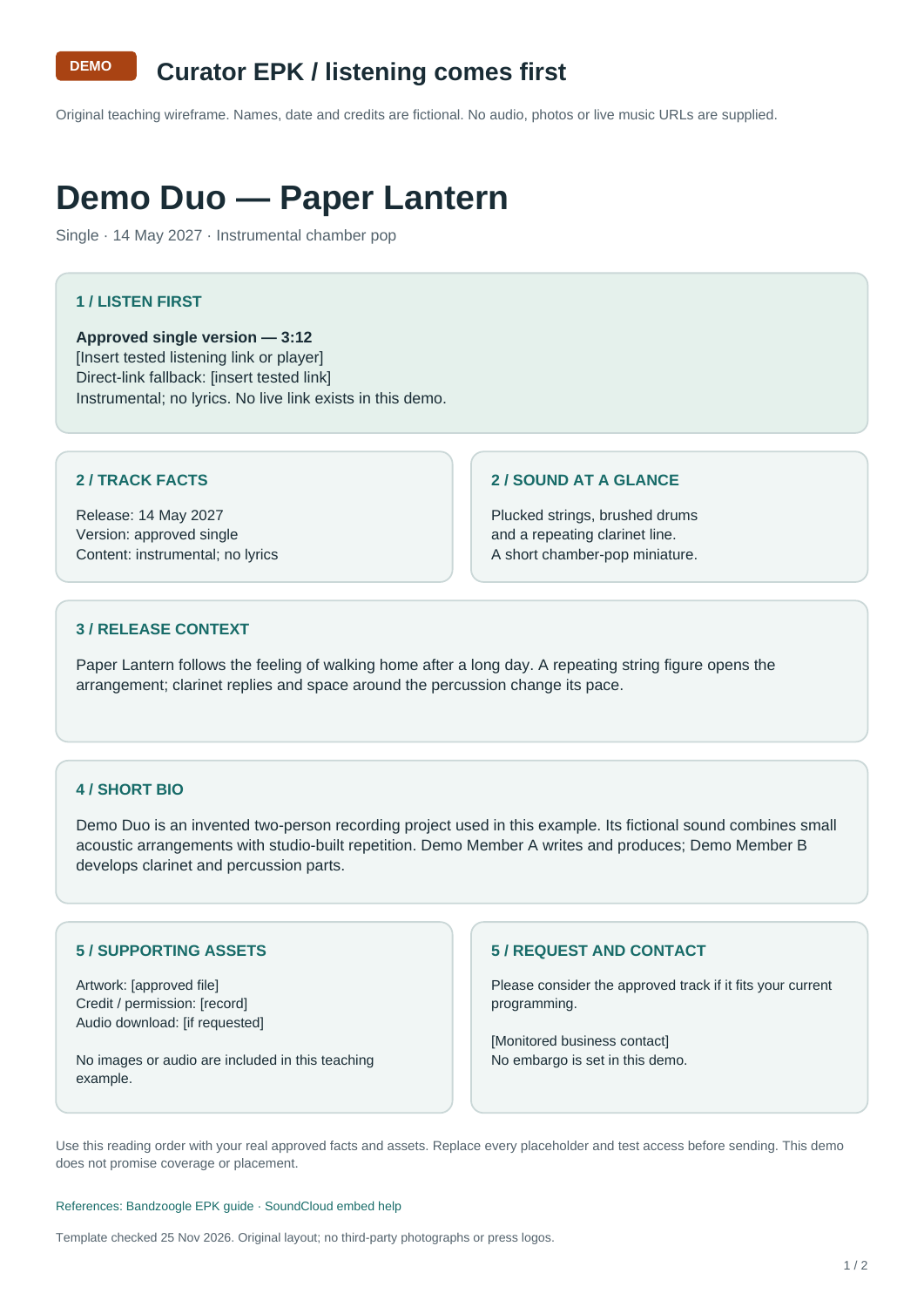
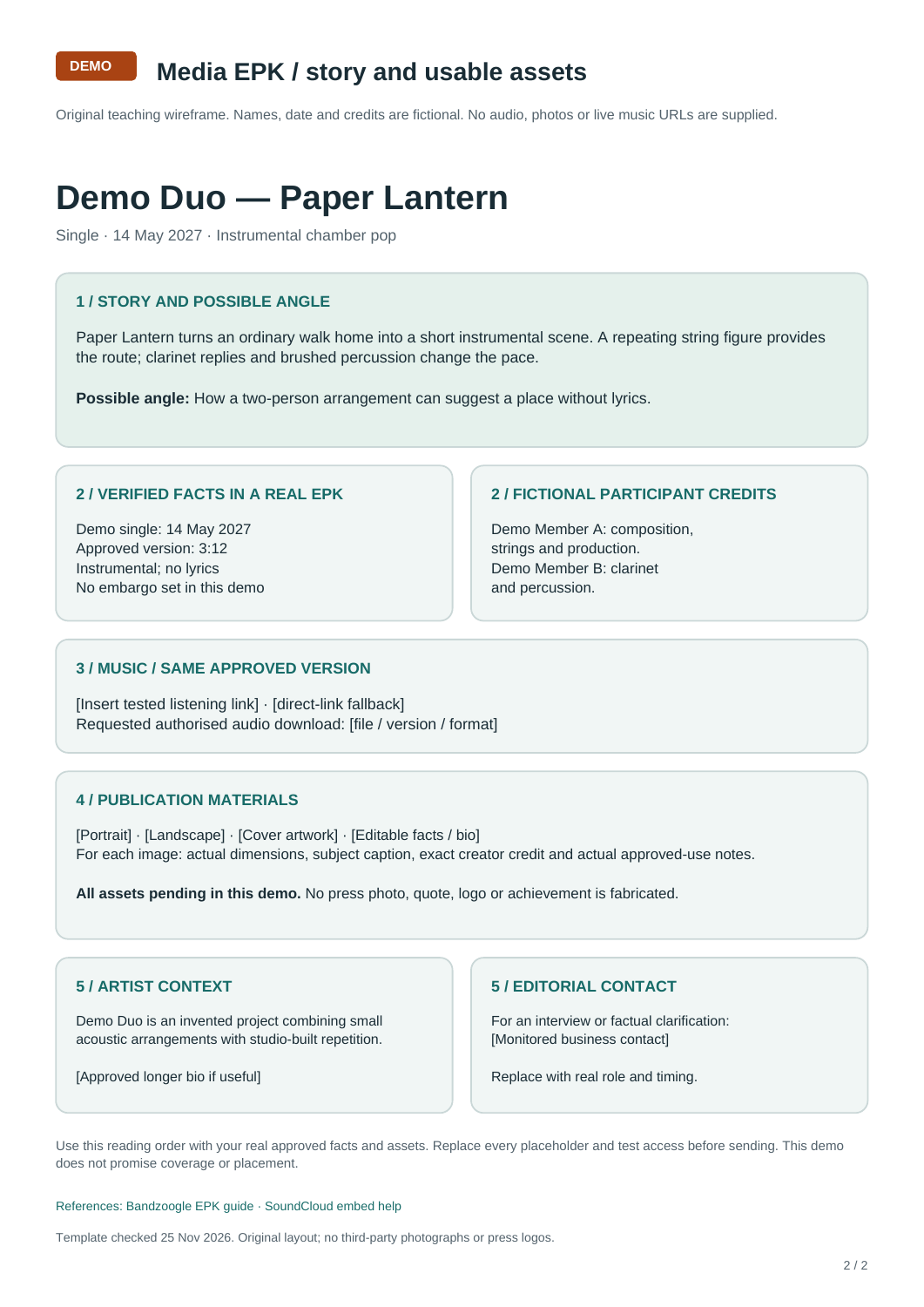
The original PDF uses labelled boxes to demonstrate this reading order. It is a portable wireframe, not a screenshot of a builder. The two editable text templates contain all fields in the same order and include a small internal QA section to remove before sharing.
A page and a PDF can complement each other. A page is convenient for music and current downloads; a PDF can be useful when a recipient requests a one-sheet. Keep a version date in either. A PDF will not play an ordinary web embed, so use explicit clickable listening links in the real document and verify them after exporting. The demo PDF deliberately has placeholders rather than fabricated music URLs.
6. Complete demo: Demo Duo — Paper Lantern
DEMO: every project name, date, musical description and credit in this example is invented for teaching. There is no real recording, press coverage, artist photograph, endorsement or audience result behind it. The wireframe contains original geometric placeholders; they are not press photographs or claims about a real artist. The example shows what the fields should say without inventing working media links.
Shared source facts
| Field | Fictional demo value |
|---|---|
| Artist / release | Demo Duo — Paper Lantern; single |
| Date / version | 14 May 2027; approved single version; 3:12 |
| Sound / content | Instrumental chamber pop; plucked strings, brushed percussion and clarinet; no lyrics |
| Participants | Demo Member A: composition, strings and production. Demo Member B: clarinet and percussion. |
| Listening access | [Insert approved listening link after creating and testing the real asset] |
| Contact | [Insert monitored business contact; no real contact supplied in demo] |
| Publication timing | No embargo in the demo; confirm any actual arrangement separately |
| Press history | None supplied; no substitute quotation or logo |
Curator page copy
Opening: “Demo Duo — Paper Lantern. A 3:12 instrumental chamber-pop miniature built around plucked strings, brushed drums and a repeating clarinet line. Single release: 14 May 2027.”
Primary action: “Listen to the approved single version: [tested link].” Under that route, list the duration, instrumental status and the exact version. If a different edit is supplied later, label it separately rather than replacing the meaning of the original link.
Release context: “Paper Lantern follows the feeling of walking home after a long day. The arrangement begins with a repeating string figure, adds a clarinet response and leaves space around the percussion.”
Short bio: “Demo Duo is an invented two-person recording project used in this EPK example. Its fictional sound combines small acoustic arrangements with studio-built repetition. Demo Member A writes and produces the music; Demo Member B develops the clarinet and percussion parts.”
Closing request: “Please consider the approved track if it fits your current programming. For the requested file version or further information, contact [business contact].” That request leaves the editorial decision with the recipient and does not imply a promised placement.
Media page copy
Story opening: “Demo Duo’s fictional single Paper Lantern turns an ordinary walk home into a short instrumental scene. A repeating string figure provides the route through the song; clarinet replies and brushed percussion change the sense of pace.”
Possible coverage angle: “How a two-person arrangement can suggest a place without lyrics.” This is a proposed discussion topic, not a claim that a publication has commissioned an interview. The release facts, participant roles and the same approved listening version sit immediately beside it.
Publication materials: “[Approved portrait], [approved landscape], [cover artwork], [captions and credits], and [editable biography/facts].” Each item remains marked pending until it exists, its permitted use is confirmed and the download has been tested. The demo makes no claim to supply the real images or audio.
Contact and timing: “For an interview or factual clarification: [business contact]. Release: 14 May 2027. No embargo is set in this demo.” If the real campaign needs a different arrangement, replace that line with the actual agreed terms and time zone.
The difference between the variants is useful emphasis. The media page expands the creation story and asset access; the curator page keeps the first audition and track details prominent. Neither adds invented praise or performance data to make the page feel complete.
7. Test the EPK as an outside recipient
Ask someone who has not assembled the files to open the actual sharing link. Have them identify the artist and release, start the intended track, find the release date, obtain the approved image and its credit, and locate the contact. Do not coach them through missing labels. Record the point where the material stops being clear or accessible.
- Open the page or PDF in the recipient’s likely device/browser context, outside the owner’s editing session.
- Start the named listening version and verify any fallback link. Record access restrictions rather than assuming they do not exist.
- Download an actual publication asset. Open the downloaded file and check its filename, dimensions and correspondence with the caption/credit record.
- Compare dates, spelling and credits across the page, PDF, facts file and asset index.
- Check the contact route and any recipient-specific submission conditions.
- Remove internal notes, mark the current version and assign an owner to review it when release information changes.
The editable checklist includes 12 assets or checks with columns for variant, filename or URL, required information, owner, permission/approval state, access-test result and last verification date. It starts at “Not checked.” Use “Not applicable” with a reason when an optional item does not fit the campaign; do not mark an absent asset approved just to complete the table.
The EPK is ready to share when the essential route works and the facts and assets are approved, not when every optional section is filled. Follow the chosen recipient’s instructions and keep an editable master for corrections. If you are also exploring labels, use the separate record-label research guide for that process. For a release-service or Send Promo workflow, review the current music release service requirements separately: an EPK supports a submission, but does not guarantee editorial coverage, placement or a particular service outcome.
