Spotify Music Video Pitching: Eligibility, Delivery and Timing
A useful Spotify video release plan connects the file, the people who can manage it, and the dates that determine the next action. Keep those records together before preparing an editorial pitch. Otherwise, a finished video can arrive with an unresolved delivery route, a mismatched song association or a deadline nobody owns.
Official documentation reviewed: 26 November 2026. This guide uses Spotify’s published instructions and links to its official upload tutorial. No artist account was inspected for the article. The checklist below is for your authorized team to complete; it does not confirm your account’s access.
Download the editable access and pitch checklist and audio/video planning diagram. You can also follow the complete planning example on this page.
Start with the current pitching rules
Spotify treats song and video pitches separately. Video submissions currently cover official music videos and performances delivered by a label/distributor or uploaded through Spotify for Artists. Eligible videos are unreleased or within the applicable seven-day window. That window starts at the video release date for distributor delivery and the upload date for direct uploads.
An Admin or Editor needs the appropriate team access: the artist team or a label team with release rights for distributor delivery; the uploading team for direct uploads. The documented path is Video & Visuals → Actions → Pitch your videos → Get started. The action appears only with an eligible asset. Complete the form and submit; playlist placement is not guaranteed.
The song has its own schedule. Spotify advises delivery at least seven days before release; already released songs cannot use the unreleased-song pitch. See Spotify’s current pitching instructions for the full rules.
Use those rules to assign work early. Avoid calculating a guaranteed final submission hour from a calendar date: your plan should preserve timestamps and the eligibility actually shown when the team acts.
Spotify for Artists also publishes How To Pitch Your Music Video for Playlisting. Keep the current written rules beside the tutorial when planning your release.
Check the tools available to your team
Spotify’s delivery overview still describes direct uploads as a beta with limited rollout. Labels and distributors remain the primary delivery route. A video appearing on another artist’s profile does not establish access for your team. Music video delivery overview
Make a dated working record. Use confirmed, not available or not checked, and give each unresolved item an owner.
| Check | Evidence to keep | Next step if unresolved |
|---|---|---|
| Artist and working team | Selected artist/team and review date | Confirm the intended working context |
| Role and release responsibility | Role, uploader and responsible rights holder | Ask the authorized owner to review |
| Delivery route | Partner confirmation or observed upload action | Establish who will deliver this file |
| Exact asset | Title, version, identifier and status | Reconcile the file with the release record |
| Relevant dates | Actual upload, scheduled release and time zone | Identify the missing event or source |
| Pitch action | Dated observation for this asset | Investigate access, status and eligibility |
| Submission | Confirmation and actual timestamp | Keep the task open until recorded |
This record helps when several people share a release. A manager can prepare the creative draft while the delivery owner resolves an asset issue. Neither task needs to be marked complete merely because the other is progressing.
Keep the different video formats separate
Canvas is a short vertical loop attached to a track in the mobile Now Playing view. It is a separate asset from a full-length video. Spotify’s Canvas explanation
New Clips uploads ended on 17 June 2026; existing Clips remain. Countdown videos on eligible Countdown Pages continue through their own workflow. Current Clips guidance
Name the requested asset in the production brief. “Single-song live performance” tells an editor much more than “Spotify video.” Keep the master, teaser exports and Canvas file in separate, clearly named folders so the uploader can identify the intended version.
Choose one delivery route for the video
Through a label or distributor
Ask the delivery partner whether it supports the intended video and planned territories. Confirm its lead time, required metadata and correction process. Audio delivery arrangements alone are not a complete video brief.
After delivery, compare the asset in Spotify for Artists with your release record: song association, artist, title, version and dates. Spotify documents delivered videos under Video & Visuals, while listener availability depends on route and market. Managing delivered music videos
If something is missing, send the responsible person a compact problem record: expected asset, delivery reference, observed status and the specific discrepancy. Resolve that record before creating another version of the same video. This keeps the team from losing track of which submission it intends to promote.
Direct upload, where available
Spotify documents a desktop workflow under Video & Visuals → Upload Video, followed by music linking and video details. It includes an unreleased-audio option and a choice between immediate and scheduled publication. The same help page lists current uploader territories and listener availability. Direct upload instructions and availability
That page also embeds Spotify’s official How to Upload Music Videos tutorial. Use it alongside the written instructions when preparing a delivery. Its presence is a useful public reference; it does not show whether your own team has the action available today.
Before submitting, have one person read back the chosen file, associated song and publication setting. Then record the actual upload event separately from the intended launch. If direct upload is unavailable, ask the delivery partner which supported route it can handle. The original beta announcement explains the rollout, but current help and the team’s observed access determine the next practical step.
Match the file to the right kind of eligibility
The current US content policy includes visualizers among supported upload types. It excludes lyric videos, static or near-static imagery, multi-song videos and videos without music. That differs from the visualizer restriction in Spotify’s June launch announcement. Follow the current content policy for the file being prepared.
Upload suitability and editorial eligibility are separate checks. The eligible pitch categories are listed earlier; do not rename an asset to make it appear to belong to a different category. If an old tutorial and a current rule disagree, record the discrepancy and resolve it before submission.
For production, Spotify recommends a landscape 16:9 master at 1080p or higher. Its policy distinguishes recommendations from other compatible inputs. Consult the live specification table for duration, file size and format instead of copying an old export preset. Current video specifications
Assign a rights owner alongside the uploader. Spotify’s US guidance describes publishing checks separately from delivery. Keep the permission record with the release rather than treating a successful file transfer as a complete clearance. Music video publishing rights
Build a schedule around actual events
An effective release calendar contains more than a public launch date. Give every milestone a planned time, an actual time and a responsible person. For example, a delivery confirmation can be recorded while the task to verify the resulting asset remains open.
| Record | What to capture |
|---|---|
| Audio delivery and release | Planned and actual events, with source references |
| Song-pitch submission | Confirmation for the selected song |
| Video delivery or upload | Route, file/version and actual timestamp |
| Video release | Scheduled date and observed publication |
| Video-pitch submission | Asset, confirmation and submitting team |
| Last eligibility review | Reviewer, time and unresolved questions |
Set an early internal target for the editorial work. Spotify’s music-video page recommends delivering and pitching on or before release day. Music-video planning guidance
A fictional schedule with two video alternatives
The following example is invented. It is not an account observation, a beta invitation or a processing guarantee. The two video paths are alternatives, not duplicate deliveries.
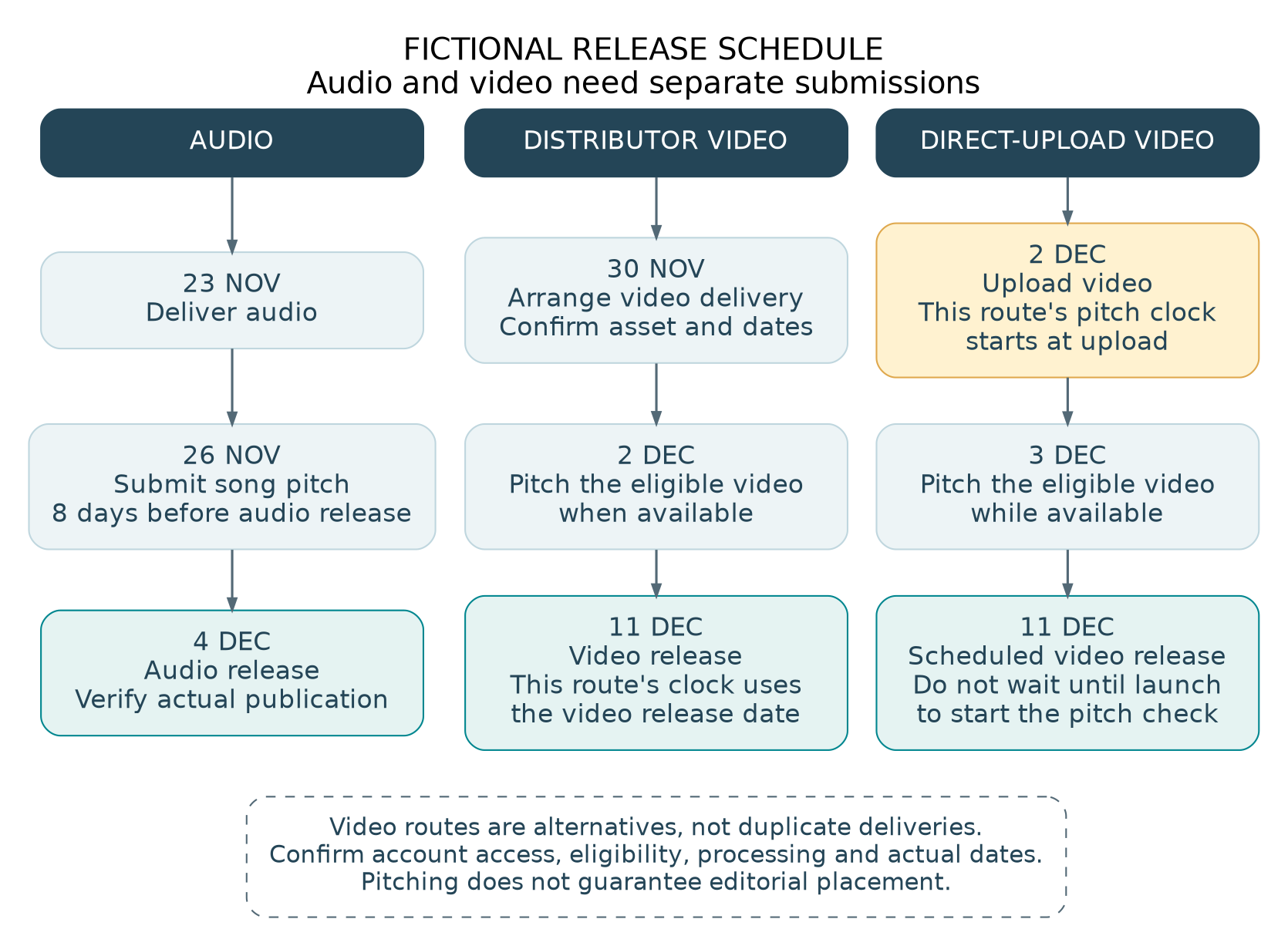
For the audio release on 4 December 2026, the team delivers on 23 November and submits the song pitch on 26 November. That is an eight-day interval before launch. It still checks that the intended song is visible and the submission is recorded.
For the distributor-video alternative, the team arranges delivery on 30 November for a video release on 11 December. In this fictional case, an eligible asset is available for pitching on 2 December and the team acts then. The delivery partner’s real requirements must be agreed separately.
For the direct-upload alternative, the team uploads on 2 December, schedules publication for 11 December and checks and pitches on 3 December. Waiting for public launch would create a nine-day gap after upload. The coordinator therefore handles the pitch check early rather than assuming the launch date preserves eligibility.
Keep planned and actual columns even when the dates match. If delivery slips, the owner can see which later tasks need review without reconstructing the release from messages.
Write a pitch about the actual video
Prepare the creative draft before the submission session. A team member should be able to compare each sentence with the file or a confirmed release plan. Describe what happens on screen, how the performance or visual choices connect with the song, and which promotional activities are actually arranged.
An original fictional example for a live-performance video of Night Ferry:
Night Ferry is a live performance of our restrained electronic-pop single, filmed with the three-piece band in a working rehearsal room. One continuous camera move follows the lead vocal into the final instrumental section; the visual shift from cool daylight to warm practical lights mirrors the song’s move from isolation to connection. This version uses live drums and a newly arranged vocal ending. Our planned release support is an artist newsletter, two rehearsal excerpts and a small venue performance announcement. All three are scheduled internally; no editorial placement is confirmed.
The example gives concrete details that a reviewer could check: the performance arrangement, camera movement and production setting. It also labels planned activity accurately. Replace every detail with something true of your own file and release.
Adapt the draft to the form currently shown to the team. No character limit is assumed here. Keep a copy of what was actually submitted so later edits to the working draft do not overwrite the historical record.
Investigate a missing action with a precise record
Start with the exact artist, team and asset. Compare the observed state with the rules above, then isolate the unresolved question. Useful questions include: Is the expected video present? Is its status clear? Are the dates supported by delivery records? Has the responsible team checked its access?
Record the review time and what was visible before asking the delivery owner or technical support to investigate. A message containing an asset identifier, route, dates and observed status is easier to act on than “the button is missing.” Avoid treating an absent action as an editorial verdict or changing truthful metadata to test an assumption.
Review publication and reporting
Check the published asset, associated song and intended version in the relevant listening context. Record any territory or account limitation observed. Keep upload confirmation, pitch confirmation and actual publication as separate milestones.
Spotify’s upload help describes video stream and listener trends, with analytics becoming available after publication. Preserve the metric label, reporting period and retrieval time when reviewing those figures. Video analytics
Canvas views, social teaser plays and total artist audio streams belong to different records. Record unavailable fields as unavailable. A later rise in listening does not, by itself, identify the pitch as its cause.
Once delivery, access and rights are resolved, define any promotion work separately. When considering Spotify promotion services, ask for the actual scope and evidence; a commercial service does not grant Spotify tool access or editorial acceptance. Keep broader Spotify listening results within their own measurement scope.
