Apple Music Artist Page: Claim and Image Readiness Checklist
Before sending listeners to an Apple Music artist page, check three things independently: the catalog belongs to the correct artist, the right person can manage the page, and the public page shows the intended image and release. A matching artist name alone proves none of these. Keep the artist URL, one verified release URL and the current access state together in a single readiness record.
This guide includes an editable record, a photo crop checklist and an original schematic showing two crop situations. A fictional example demonstrates how to separate artists who share a name. It does not represent an actual Apple account, submitted claim, uploaded photograph or approval.
- Download the artist-page readiness record
- Download the image and public-page checklist
- Download the original crop teaching diagram
The official guidance was checked on 26 November 2026. Account actions and device-specific public checks remain tasks for the authorised artist team; they were not performed for this article.
1. Locate the exact page and a release you can identify
Start with a recording the team knows, not the first matching artist search result. Open its release page, inspect the title, artwork, track list and credited artist, then follow the artist destination. Save both links. Together they give the reviewer a stronger identity trail than a name typed into a search box.
Add the release's approved internal reference if you have one, such as its delivery record. That reference helps the team distinguish similarly named releases while keeping the public artist and album URLs easy to find. Do not publish account records or private delivery documents in a public press kit merely to make this internal check easier.
If the page contains unfamiliar releases, investigate before requesting control or attaching it to a campaign. Apple acknowledges that music from artists with the same name can appear together. Its FAQ provides an Artist Catalog Issues route and asks for the artist name, relevant album links, correct artist-page link and whether access is already approved. Missing releases and metadata changes may instead need the distributor or label's involvement.
DEMO: two artists named Mira North
Imagine an electronic artist named Mira North preparing a release called “Signal Rooms.” Search also returns a fictional acoustic artist named Mira North with a release called “Low Tide Letters.” The names match, but the music and release records identify different artists.
| Candidate | Evidence in this fictional example | Working decision |
|---|---|---|
| Page A | Contains Signal Rooms; credits and artwork agree with the team's approved record | Candidate to verify and use in the claim |
| Page B | Contains Low Tide Letters; no connection to the team's recording | Exclude from this artist's campaign |
| Mixed page | Contains both releases | Record a catalog issue; do not assume the page is ready |
The downloadable record keeps URL fields blank rather than inventing live Apple destinations. In your own check, paste the actual links and record the observations. A page that “looks like our genre” is not enough. The recording and delivery evidence should establish the connection.
2. Establish who should request access
Apple's claim instructions state that artists and artist managers can claim a page. The content must have been live for at least five business days, and the claimant must be the primary artist on the selected album; a featured-only role does not provide that claim route. Label representatives should work with the artist to obtain team access. The request is available through the website or iOS app.
For a team, name the person responsible for the claim before starting it. Ask whether an existing artist or manager already has Admin access. If the page is already managed, the useful next action may be a role invitation from that administrator rather than a separate claim attempt.
Record the intended account email privately in the team's access record if needed, but never place a password or one-time sign-in code in the shared readiness sheet. The person operating the account should authenticate directly. A designer can prepare the image without receiving the artist's login.
Keep authority separate from availability. Someone may be available to upload a photo today without being the right person to claim ownership of the page. Conversely, an artist may be the appropriate claimant while preferring a trusted editor to handle future image updates. Plan those responsibilities before an urgent launch creates pressure to share an account.
3. Prepare a short evidence register
Build the claim from accurate, consistent information. Apple's claim guide asks for evidence of the applicant's identity or relationship to the artist and identifies distributor connections, websites and media accounts as useful supporting information. It also instructs the applicant to select one of their albums to confirm the correct page.
Your register can be small. Use one row each for the artist URL, the matching release, the official website and the relevant distributor or social connection. Next to each, explain what it establishes. “Artist website links to this exact release” is better than an unlabeled list of five accounts.
Check that the names and roles agree across the evidence. A manager's personal profile may establish who the applicant is but not automatically show their relationship to the artist. Record the relationship accurately and use the application fields to provide the requested context. Avoid padding the request with unrelated links or unsupported claims of representation.
Before submission, have another team member compare the selected page and album with the register. This is especially useful for the Mira North situation: a mistaken page selection can survive a careful review of everything else if nobody checks the actual destination.
Keep a dated record of the request and the status observed afterward. The official claim guide describes a Pending state and email updates. Treat a pending request as pending; a saved form or confirmation that information was received does not establish that access has been granted. Do not build the release schedule around an invented approval date.
4. Use states that describe what has actually happened
The readiness record uses four working states. They help a team coordinate; they are not a replacement for Apple's exact interface messages.
| Working state | Meaning in the team record | Evidence needed before moving on |
|---|---|---|
| Unclaimed or access unknown | The team has not established who can manage the page | Identity check and existing-access investigation |
| Pending | A claim is in review | Actual account status or message |
| Accessible | The authorised user can open the intended artist page in the management account | Correct artist selected and relevant role confirmed |
| Publicly checked | The listener destination has been checked after the relevant updates | URL, device/context, date and observed result |
Access and public readiness can diverge. A team might have management access while the image is still being reviewed. A public artist page can also exist before the team has claimed it. Preserve those distinctions in separate fields rather than forcing every task into one green “ready” box.
If someone says the page is ready, ask which state they mean and where the evidence is recorded. That small clarification prevents a pending image from being treated as a visible campaign asset.
5. Prepare an image for the actual crop
Choose an image that represents the artist and that you are authorised to use. Review the original file before exporting. Pixelated source material does not become detailed because an export dialog produces a larger canvas.
Apple's current artist image guidelines prefer 2400 × 2400 pixels or larger, specify an 800 × 800 minimum, list JPG or PNG and 72 dpi, and say not to upscale. The cropping tool gives the actual placement guides. For a portrait, Apple asks that eyebrows and lips stay within them. It also permits an appropriate artist logo or character image under its stated conditions; the complete design must fit the crop, and a logo background must be opaque.
Use those requirements as the starting point, then inspect the image's composition. Is the face easy to identify when small? Does a group photograph leave enough room for each relevant person? Is important detail already close to an edge before the crop begins? Try a different source frame when necessary instead of repeatedly squeezing an unsuitable photograph into the available area.
The downloadable diagram uses original geometric shapes to explain the decision. Its dashed lines are teaching guides, not Apple's exact crop measurements. One panel shows room around the illustrated subject; the other deliberately cuts off important features. It contains no real portrait and is not intended for upload as an artist image.
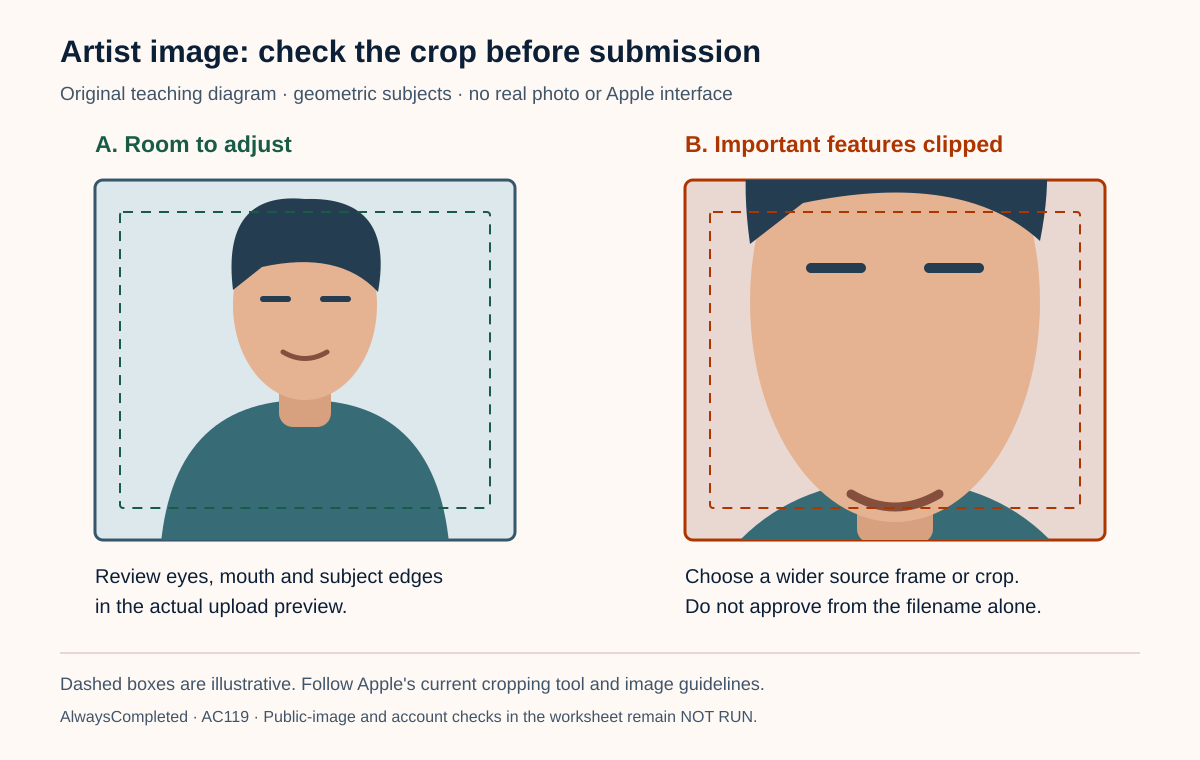
A useful review note names the problem: “top of head clipped in the selected crop” or “rightmost member disappears in the small preview.” “Make it more professional” gives the editor little direction. Keep the source filename and the chosen export version beside each note so everyone reviews the same image.
6. Check content and permissions before submitting the image
Apple's image rules prohibit several common problems, including low-quality imagery, borders, marketing copy, third-party logos, album cover art and QR codes. Read the complete current guidelines for your chosen image type. A release poster that works in a social announcement is not automatically suitable as an artist portrait.
The image upload guide allows Admin and Profile Editor users to submit images through the app or website. It explains that images are reviewed and that the updated artist image is used on Apple Music and Shazam. A submitted image can therefore still be awaiting review rather than appearing publicly.
Confirm the assigned role before diagnosing a missing control as a broken account. Apple's role documentation distinguishes Admin, Analyst and Profile Editor permissions. Give the person responsible for image maintenance the appropriate role through the administrator's process; viewing analytics is a different job from editing the profile.
Select the correct artist if the account contains several pages. Load the approved file, examine the crop in the actual tool and submit only after the reviewer agrees. Record the filename, crop decision, submission time and resulting status. If the image is rejected, preserve the stated reason and correct that issue before sending a new version.
7. Check the public destination on a phone and desktop
After the relevant update is approved and visible, open the exact artist or release URL planned for the campaign. Start from that link rather than navigating only inside the management account. Confirm the name, music and image together. A correct portrait above the wrong release still fails the campaign's intended destination check.
Record a phone check and a desktop check separately. Include the app or browser, sign-in state and market if it matters to the release. Observe what is visible, whether the image crop works and how a listener reaches the advertised recording. Do not turn one successful view into a claim about every country or device.
Check a release link differently from an artist link. A release campaign should make the promised recording straightforward to reach; a broader artist introduction should make the identity and catalog clear. Keep the destination type in your handoff so another teammate does not replace a checked album URL with an unchecked search result.
If the image is still pending, leave that check open. If catalog content is incorrect, retain the issue reference and owner. If a phone test has not happened, mark it NOT RUN. These unfinished fields help the team finish the work; an unearned pass hides it.
8. Hand over the verified page and its remaining limits
Your completed record should answer four questions: which artist page is correct, who manages it, which image version is public, and which destination was checked for this campaign? Include the date and any unresolved limitation. That gives the next person enough context to use the link without repeating the identity investigation.
For a separate platform comparison, review the current music platform promotion services by destination and action. An Apple Music profile check does not establish that a paid listing includes account access, image approval or a particular listener outcome. Match the proposed service to its actual description and confirm unclear conditions with support.
Keep this record with the release handoff and revisit it when the catalog, management team, artist image or campaign destination changes. The goal is a page the correct team can maintain and a listener route whose actual state is known.
