Spotify Countdown Pages vs Pre-Save Links: Plan the Right Release Journey
Choose a Spotify Countdown Page when the artist and upcoming album or EP meet Spotify's current eligibility rules and you want a pre-save destination inside Spotify. For a single, or a different set of listening services, evaluate a specific hosted pre-save product and test its actual authorization and release-day behavior.
The choice is about the listener's route, not just the appearance of the landing page. A page visit, a pre-save click, an authorized request, a release added to a library and a stream are separate events. None automatically establishes that someone will become a repeat listener.
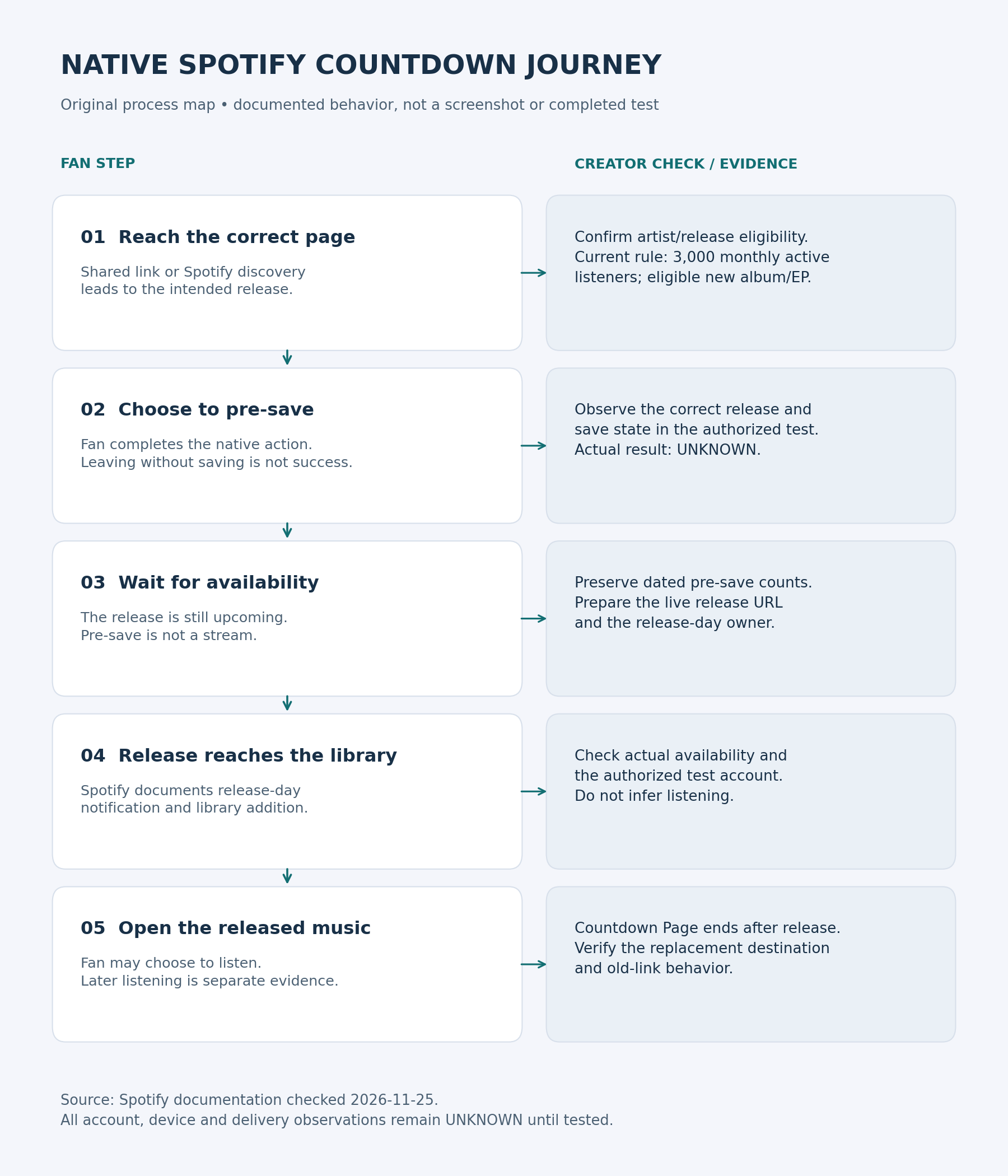
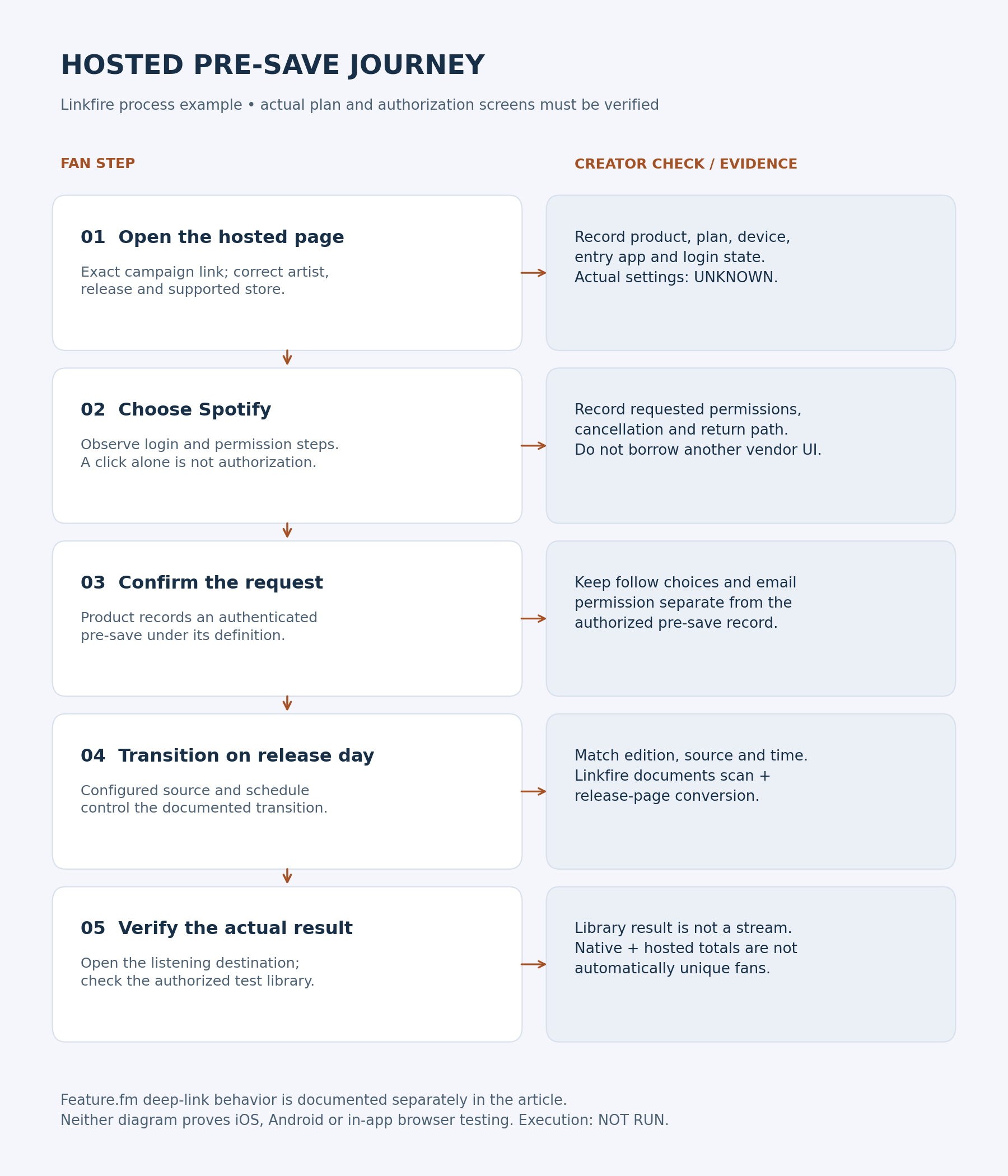
Use the original native journey map, hosted journey map, device QA table and release-day worksheet. These are documented-process illustrations and blank test records. No private Spotify, Linkfire or Feature.fm account, mobile flow or release delivery was tested for this article.
Check release eligibility before designing the campaign
As checked on November 25, 2026, Spotify requires at least 3,000 monthly active listeners for Countdown Pages. Check that specific audience segment; overall monthly listeners are a different measure.
Spotify limits the feature to new, original albums and EPs. Singles and rereleases such as deluxe editions, reissues, remasters and compilations are excluded. Delivery must arrive through the label or distributor via DDEX. For multiple main artists, only the first-named main artist can create the page; support for split-rights releases remains limited. These are Spotify's current eligibility requirements, not a statement about any particular artist's access.
Record the release type, credited artist order and current access in the worksheet. If something is unclear, resolve it with the distributor or Spotify support before promising a Countdown Page in the campaign plan. Do not repackage a single merely to imitate an eligible release.
An ineligible Countdown Page does not prevent you from preparing a useful release journey. It means you need a different destination: for example, a supported hosted pre-save for the single, or a clear announcement page that becomes a listening page once the music is available.
Compare the routes by the job they must perform
| Planning question | Spotify Countdown Page | Named hosted pre-save product |
|---|---|---|
| Where is the pre-release destination? | Inside Spotify | On the selected provider's page or supported route |
| What must be checked first? | Artist and release eligibility | Supported release type, store, plan and configuration |
| What does the fan need to do? | Reach the correct release and complete its pre-save action | Reach the page, choose a store and complete any required login and permissions |
| What needs separate review? | Correct release, save state and eventual library result | Authorization, follow choices, email permission and delivery settings |
| What happens after release? | Use the live release destination and verify the documented library outcome | Verify the provider's configured transition and each listening destination |
The hosted column is a checklist of questions, not a promise that every vendor has the same features. A normal smart link that routes people to streaming services is not automatically a pre-save integration.
You can also use both routes for an eligible release if each serves a clear purpose. For example, an external page could present several listening services while directing Spotify listeners to the native option. Test that exact configuration rather than assuming the two systems share counts, permissions or saved audiences.
Native journey: from Countdown Page to the released music
The native journey map separates the fan action from the creator's verification. The fan arrives at the correct Countdown Page, chooses to pre-save and later encounters the released music. The creator checks the release identity, the saved state and the post-release destination.
Spotify says Countdown Pages support pre-saves and release previews, and that it notifies pre-savers and adds the release to their library when the music becomes available. That is the documented product behavior; it is not a guarantee of listening. See Spotify's Countdown Pages overview.
There is an important transition to plan: Spotify's countdown-video documentation says the Countdown Page and its associated videos are no longer available after release. Prepare the live album or EP link for your biography, scheduled posts and other destinations. Test what the old external link does; do not assume a particular redirect behavior without checking it.
For a fictional new EP, the practical launch note might read: “Before release, use the verified Countdown Page. After release, use the verified EP destination. Confirm that the release appears in an authorized test listener's library, then review actual listening separately.” This is a planning example, not a completed test.
Hosted journey: use Linkfire as a specific example
Linkfire's pre-release guide describes pre-saving an upcoming track or album. Its setup requires the correct release source and scheduled date/time for delivery. It also distinguishes pre-save clicks from authenticated pre-saves in its workspace reporting.
The hosted journey map therefore uses separate checkpoints: open the page, choose Spotify, complete the required authorization, see the product's confirmation, and verify the release-day result. A browser opening the page only completes the first checkpoint.
Linkfire documents a scheduled scan and conversion from a pre-release page to a release page, with listening destinations replacing the pre-save buttons. It describes different Spotify library destinations for album-level and track-level sources. Check that the identifier matches the intended edition and release type before relying on that automation.
The same guide records email consent separately and instructs users to include only fans with affirmative consent in an email list. Do not treat an authorization record or exported email field as automatic permission for every future message. Review the actual wording and choices shown in your campaign.
These are Linkfire-specific statements. They should not be copied onto an ordinary Bandzoogle smart link, an unrelated pre-save tool or an AlwaysCompleted service. In your report, name the product, plan and setup actually used.
Feature.fm deep links do not remove the permission question
Feature.fm's deep-link documentation describes Spotify authorization deep links on Android and iOS for its paid plans. It says an active Spotify session can simplify the journey, but first-time users still need to accept the third-party permissions when prompted.
Treat that as a documented capability to verify on the selected plan and devices. It is not evidence that your own Instagram or TikTok in-app browser test has passed, or that a signed-out listener will have the same experience as a returning user.
Feature.fm separately documents account connection, a success step and optional follow-related choices in its setup-to-release guide. That guide also describes a transition based on the selected release date, time and time zone. Inspect those settings in the chosen product rather than borrowing Linkfire's configuration assumptions.
Record four distinct questions: which account is being connected, which permissions are requested, which follow actions are selected and what email permission is given. If a field or feature cannot be verified, write unknown. Do not describe it as absent, included or automatic simply because another provider works that way.
Keep clicks, authorization, delivery and listening separate
| Evidence | What it can support | What it does not establish |
|---|---|---|
| Page visit or pre-save click | Recorded interest in opening that step | Completed authorization |
| Authenticated pre-save record | The provider recorded the required authorized request under its definition | Successful release-day delivery to every account |
| Delivery or library observation | A documented result for the account and release checked | A stream or repeat listening |
| Streaming and audience data | The listening measures the source actually reports | A causal effect of every earlier click |
Suppose a hypothetical hosted report shows 200 pre-save click events and 80 authenticated pre-save records. You can report those two counts with their definitions. Do not call them 80 listeners, 80 future streams or a 40% conversion rate among people unless the product's units, cohort and deduplication support that specific calculation.
If no release-day delivery evidence exists yet, leave the result unknown. A confirmation screen before release is evidence about the request at that moment, not proof that the correct edition later reached the library.
Spotify also distinguishes its current pre-save count while a Countdown Page is live from the count of listeners who had pre-saved when the release came out. Preserve the observation date when recording those figures, using its counting explanation.
Do not add hosted and native totals and call the result unique fans without a valid overlap method. The same person could use both routes. Likewise, avoid treating a provider's aggregate marketing statistic as a forecast for your release.
Plan release day as a change of purpose
Before release, the page asks for an action concerning future availability. After release, it should help the fan listen to the right music now. Prepare that change alongside the distribution plan.
Use this sequence in your handoff:
- Confirm the release record. Match artist, title, edition and distributor identifiers to the intended destination.
- Record time and territory assumptions. Keep the distributor's availability plan separate from the hosted page's scheduled transition. Resolve mismatches before launch.
- Prepare the live destination. Update the copy from a future action to listening only when the music is actually available in the relevant context.
- Check library delivery with permission. Use an authorized test account and the destination expected for that product and release type; record the observation rather than assuming success.
- Check external placements. Open the biography link, scheduled post and other shared entry points, including any old pre-release URL.
- Record unresolved states. If a store destination is wrong or unavailable, identify it accurately and use a verified route while the owner resolves it.
For a fictional single, a hosted page might be the appropriate pre-release tool because a Countdown Page is not eligible. The relevant launch question then becomes whether that particular provider saved the correct track and changed the page at the intended time. The single's pre-save count cannot answer those implementation questions by itself.
Test the actual mobile journey before sharing widely
Use the QA table for each selected product. It includes iOS and Android, ordinary browsers and in-app entry points, with separate planned conditions for installed apps and signed-out sessions. All results begin unknown and the execution status is NOT RUN.
For each real test, record the device, operating-system version, browser or social app, Spotify installation/login state and whether the person has previously authorized the provider. Start from the exact link you intend to share. Watch what happens when the listener continues, declines or cancels. A cancellation should remain a non-completion in your notes.
Capture the wording of the authorization and email choices without exposing account credentials or private tokens. Confirm which screen represents a completed request and what record appears in the provider's report. Repeat the relevant checks after release for the page transition and library outcome.
If a device, plan or permission step has not been checked, keep it unknown in the launch handoff. This is more useful than a blanket “mobile tested” label that hides the untested in-app route.
Choose the route you can explain and verify
Start with release eligibility, then identify the exact product and fan action. Complete the release worksheet, assign a release-day owner and preserve unknowns until someone observes the result.
Use the single-release plan for the broader timeline and the music smart-link journey guide for measuring published listening links. If you are considering Spotify music promotion, agree the destination and dates after the listener's route works. A pre-save tool and an additional promotion service perform different jobs; neither promises future listening by itself.
