SoundCloud Profile and Spotlight Audit for a New Release
A useful SoundCloud profile audit starts with the visitor's next task: find the current release, understand who made it, and choose a sensible next action. Check identity, biography, artwork, featured music and links as one journey. A complete profile is helpful only if its priorities are clear.
For a new listener, the first task is usually choosing something to hear. For a potential collaborator, promoter or label contact, the task may include understanding the artist's work and finding a professional contact route. One public profile can serve both, but the current release should not disappear inside an undifferentiated list.
Use the new-listener wireframe, music-partner wireframe, editable audit checklist and profile planning worksheet. The two images are original annotated concepts with fictional content, not screenshots of SoundCloud or examples of measured results.
Choose the profile's main job for this release
Write a primary task and a secondary task before editing. For example: “A new visitor should find Windows at Dawn and start listening; a music partner should find the contact page without searching through track descriptions.” The song title is fictional here, but the decision is practical.
SoundCloud describes the profile as a public hub containing uploaded and reposted content. Its Get Heard guidance identifies photo, biography, links and Spotlight as profile preparation. The platform overview explains why uploads and reposts can both affect what a visitor encounters.
Decide which item deserves attention first. For a single campaign, that may be the released single. For a broader project, it may be an eligible playlist or album presentation if your available features support it. The decision should match the link and promise in the material bringing people to the profile.
If an advertisement promises one song, consider whether the actual campaign requires that track's URL instead of the profile URL. The profile still needs to make sense for people who explore the artist, but a visitor should not have to guess which upload the promise concerned.
Review identity without inventing a bigger story
Check the display name, recognizable image and visible release identity together. A visitor arriving from another channel should be able to tell that this is the intended artist. Make differences understandable if a project name, collaboration or alternate release name is involved.
Write the biography from information you can substantiate: what kind of work the artist makes, what is current and where the visitor can go next. Avoid unsupported claims about popularity, industry support or past achievements. A clear description does not require a fabricated testimonial.
SoundCloud's profile-description guide documents biography and web-link editing. Use those fields for useful context; the maximum available space is not a target to fill.
Fictional biography for a new listener
“Electronic songs built from small urban sounds. Start with Windows at Dawn, the current release, then explore the earlier recordings below. The listening link collects other available services; credits and contact details are on the artist page.”
This version gives the music a description and names the starting point. Replace the fictional details with true information, and only mention a linked page if it actually exists and contains what the text promises.
Fictional biography for a music partner
“Electronic songwriter and producer. Windows at Dawn is the current release; the selected originals show the wider sound, and the live arrangement shows a different performance format. For project enquiries, credits and approved artist materials, use the contact page.”
This version explains the purpose of each item. It does not imply that a label, promoter or collaborator has already endorsed the artist. If there is no live arrangement or professional contact page, remove that claim and make the missing material a task in the worksheet.
Check artwork and links as functional parts of the page
Look at the profile image at its actual display size. Confirm that its crop still identifies the artist and that the release artwork is distinguishable from the avatar. The header can establish a visual setting, but essential instructions should remain readable elsewhere.
SoundCloud's image and header guidance warns that header text can be cropped on smaller screens. Put the release title, current status and important link explanation in text fields as well, rather than relying on a banner to carry the whole message.
Open every link from the visitor's route. Check the destination, page title, current release, public availability and contact method. A working URL that opens the wrong edition, an expired campaign or an empty press page is still an audit failure.
Use a small set of purposeful destinations. A listener might need the current release elsewhere; a partner might need credits, approved materials or a contact page. The useful test is whether each destination answers a real question, not how many links fit.
Some banner-link and featured-profile features are described in SoundCloud's premium profile-customization guide. Verify what is available on the actual plan before making one of those features essential to the journey. The wireframes use an information hierarchy, not a promise that every account has every shown placement.
Choose Spotlight content using the actual plan
As checked on November 25, 2026, SoundCloud's dedicated Spotlight guide distinguishes Artist: one track from Artist Pro: up to five tracks or playlists. Its subscription comparison lists no Spotlight on Basic. Record your actual plan and visible capacity before planning the selection.
If one position is available, choose the single item that best supports the current task. Do not design a five-item launch plan around a one-track allowance. If several positions are available, give each item a different purpose rather than filling every position by default.
For example, a current release can introduce the immediate project; a selected-originals playlist can provide broader context; an authorized live arrangement can answer a performance question. Those are editorial roles, not mandatory SoundCloud sections or a recommended number of pins for every artist.
The Spotlight guide currently describes selecting public releases from the most recent 200 uploads and arranging the selected items. Private tracks and older items outside the supported selection are not eligible under that documentation. Check the actual selector if the intended item is missing; search the exact title and verify its status before assuming the feature is broken.
Can a repost be added to Spotlight?
No. SoundCloud's repost documentation explicitly says reposts cannot be added to Spotlight. A repost appearing on the profile is different from an eligible item you can feature there.
Reposts can still express a real connection to the scene. The audit question is whether the current release remains easy to find alongside them. You do not need to manufacture a clean-looking history by presenting someone else's work as your own.
Wireframe 1: help a new listener choose a starting point
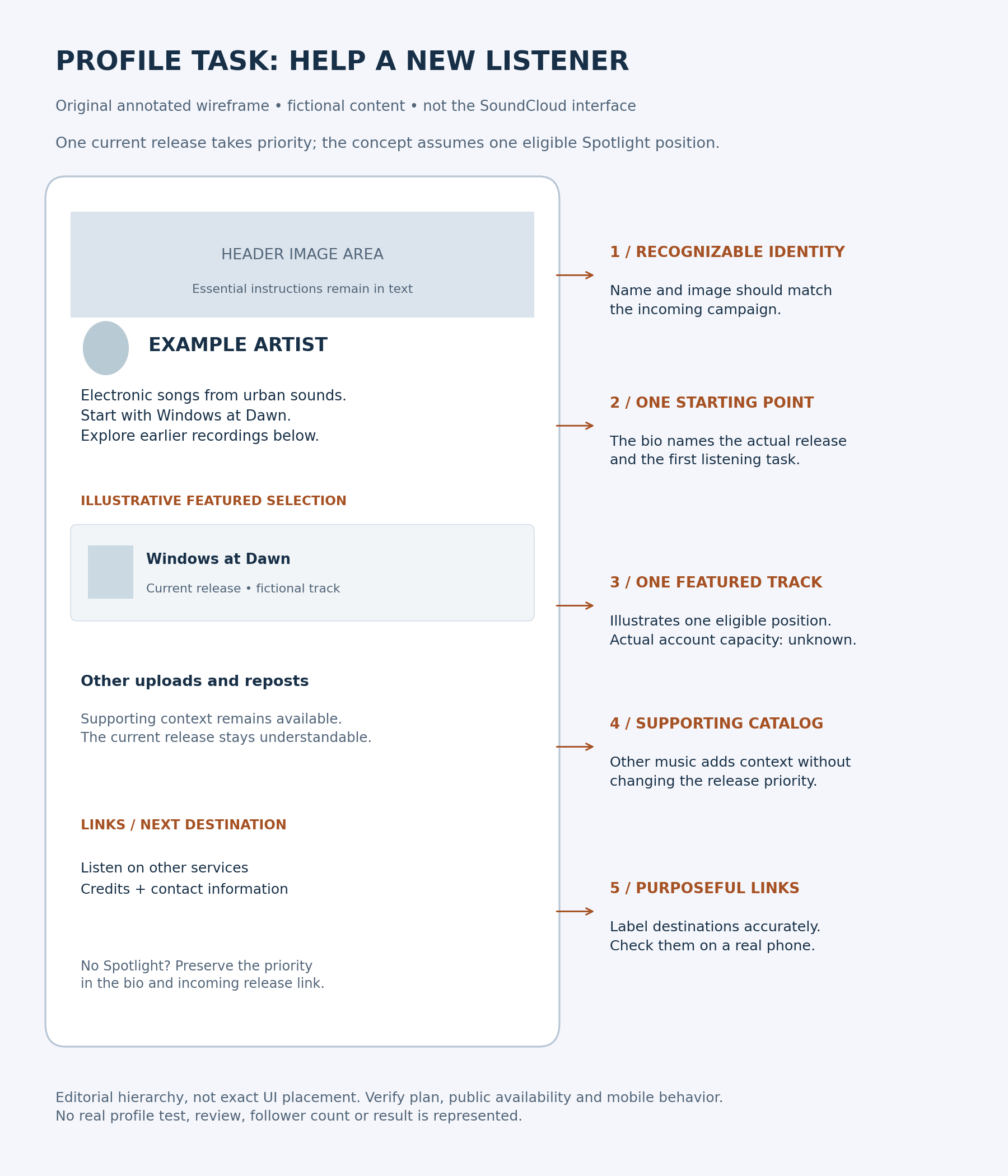
The listener concept uses one featured track. It assumes that a suitable Spotlight position is available; it does not claim that an actual account was checked.
The identity area answers “Whose music is this?” The biography answers “What should I try first?” The featured track gives that answer a direct destination. The other uploads remain supporting context, and the links explain where to listen elsewhere or find more information.
The concept deliberately omits follower counts, review quotes and invented achievements. Its annotations identify the decisions to make, rather than imitating SoundCloud's precise interface or promising a change in engagement.
To use it, replace the fictional title with the actual release, verify its public link and check whether the first visible content matches the biography. If Spotlight is unavailable, keep the same editorial priority in the text and your incoming campaign link. Do not claim that the profile has a pinned item when it does not.
Wireframe 2: help a music partner assess the work
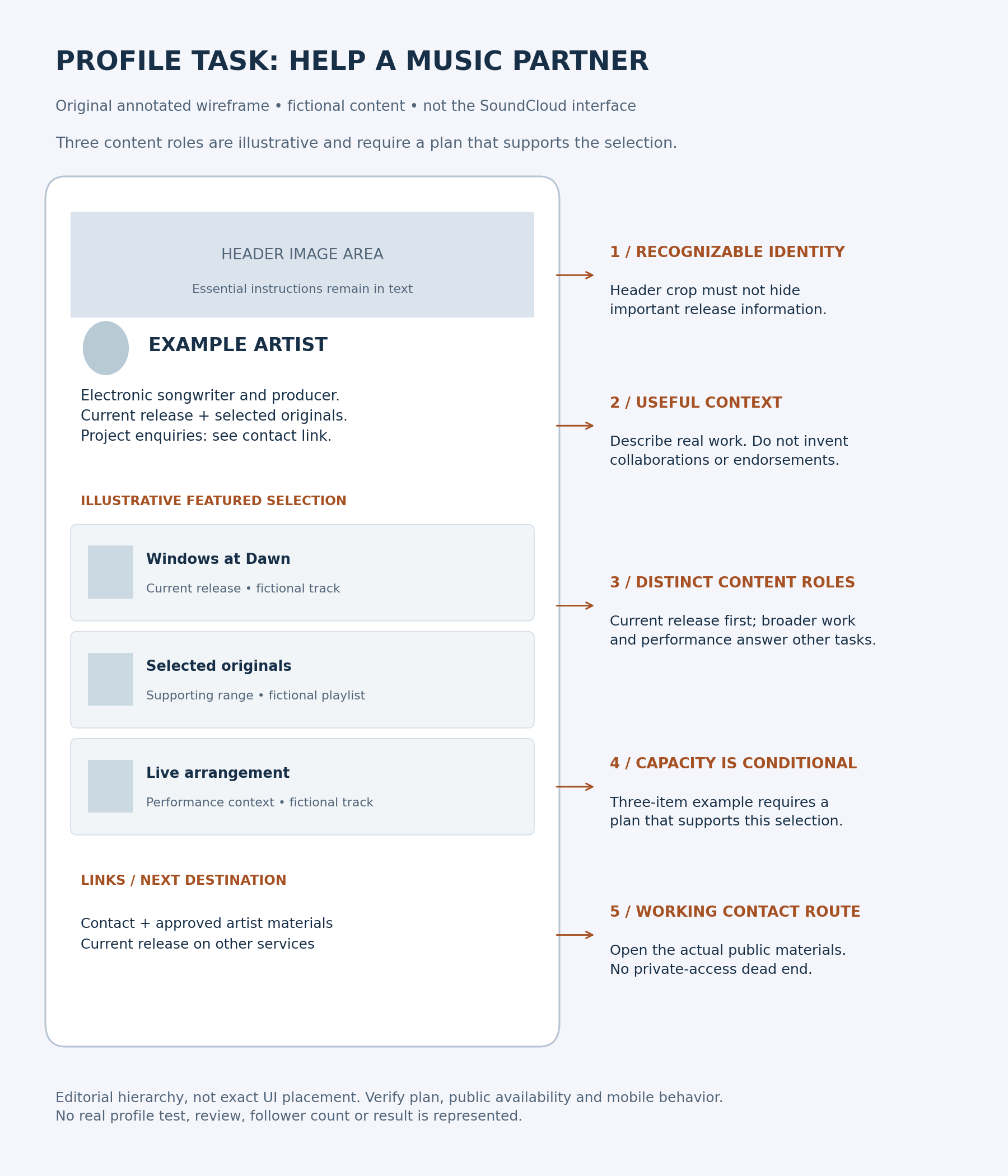
The partner concept illustrates three different content roles on a plan that supports that selection. The current release remains first. A selected-originals playlist provides range, and a live arrangement provides a distinct performance reference.
A contact-and-materials link is clearly described. The destination should contain the information you genuinely intend to share, such as accurate credits, a concise biography and approved artist images. Do not send every professional visitor through an unrelated store or a chain of unexplained links.
This concept is not a second profile that must be built. It is a way to review the existing profile from another visitor's perspective. If the current release campaign is mainly for listeners, preserve that first-listen priority and make the professional route easy to locate without overwhelming it.
| Visitor question | Listener-oriented answer | Partner-oriented answer |
|---|---|---|
| Where should I start? | One current release | Current release plus clearly different supporting work |
| What is the artist's sound? | Short accurate description and the music | Description, selected originals and relevant context |
| What should I open next? | Another listening destination or supporting track | Credits, approved material or contact page |
| What should not be implied? | Popularity from fabricated social proof | Endorsements, availability or collaborations that do not exist |
Check the mobile visitor journey
Open the exact profile link used in the campaign on the devices and entry points that matter. Include an ordinary mobile browser and an in-app browser if that is where people will arrive. Where possible, inspect the visitor view rather than relying on the editor preview.
Can the visitor identify the artist, find the intended music and understand the link labels without the header text? Does the featured content appear as expected? If the app opens, does it reach the same profile or release? Record the actual behavior instead of assuming all routes match.
Then test the partner task: find the contact page, open the approved material and confirm that the page is usable on the phone. A link that depends on access permissions the visitor does not have is not ready for that public journey.
The downloadable checklist leaves device observations blank and marks every check NOT CHECKED. No live SoundCloud profile or phone test was performed for these wireframes. Use the record to capture the actual result, including blocked access or a feature unavailable on the plan.
Keep track editing and profile editing in scope
Correcting a biography, featured selection or link does not replace a track-metadata review. If the audit reveals an incorrect title, credit or description, record that as a separate task and use the SoundCloud metadata worksheet.
SoundCloud's track-editing documentation also makes clear that edits on SoundCloud do not update releases already distributed to other streaming services. Do not mark the broader release fixed merely because the SoundCloud profile now looks correct.
Between release campaigns, review the featured selection and the biography's time-sensitive language. Replace a stale “out soon” statement when availability changes, verify the next destination and preserve useful catalog context. A profile can evolve without pretending every older recording is a new release.
Save a dated audit before promotion
Record the profile URL, current plan, intended visitor tasks, selected content, link destinations, devices checked and unresolved issues. Save a dated view of the page and the actual checklist results so the team can distinguish a completed edit from a proposed one.
Assign an owner to each remaining issue. An unavailable item needs an eligibility check; a broken link needs a verified destination; a missing contact page needs real approved content. Close the audit when the important visitor tasks work, not merely when every field contains text.
Before choosing a SoundCloud promotion service, check whether its stated scope accepts a profile URL or requires a particular track URL. Use the destination the service actually supports and that matches the campaign's promise. A clearer profile prepares the visitor's route; it does not guarantee plays, partner interest or future listening.
