Instagram Profile Visits but No Website Clicks: Audit the Next Step
If Instagram profile visits are not followed by website clicks, check the measurement and then walk the visitor’s path: content promise, profile explanation, link label, destination and final action. A profile visit can be useful interest without an intention to leave Instagram. It can also expose a confusing next step. The numbers alone do not distinguish those cases.
Start by confirming what “no clicks” means in the report you are reading. Is a website-tap field actually zero, unavailable, or being confused with site sessions? Then inspect whether a visitor can understand what the link offers and reach it on a phone. Fix a concrete break before testing a more persuasive message.
This guide provides a 12-point editable audit, three original bio and CTA examples and an original profile-to-website path map. The full checklist and examples are also below. Documentation was checked on 25 November 2026. The teaching examples are fictional and make no performance claim.
1. Match the content promise to the profile
Open the content that is supposed to send people to your profile. Write down its promise in plain language: see the collection, hear the complete track, get the checklist, understand the service, or ask about availability. Next, open the profile as a visitor and look for the same idea. If the content promises a specific item while the profile introduces several unrelated offers, the visitor has to reconstruct the connection.
Use the name, image, bio and relevant visible content to make the identity recognisable. A person should be able to tell that they arrived at the account behind the content they just saw. That is a continuity check, not a promise about Instagram search ranking. Search discoverability is a separate task from helping someone who is already on the profile.
Choose a primary next action for the current brief. It need not be the only thing your business does. A shop running a collection announcement can prioritise that collection; an artist introducing a track can prioritise listening; a consultant sharing a practical method can offer the related worksheet. Keep other valid destinations understandable without making all of them compete equally for attention.
Buffer’s own profile guide uses its bio as an example of explaining the service and intended audience plainly. The useful principle is to make the offer understandable. Your copy should describe your actual work and destination, not borrow another brand’s identity, proof or promises. Source: profile and bio examples.
2. Make the bio and link label explain the next action
A useful bio answers three questions quickly: what is this account about, who is the offer for, and what happens next? Remove words that sound positive but leave those questions unanswered. “Helping you achieve more” could describe almost anything. “Project handoff checklists for small teams” gives a visitor a recognisable task.
Make the action specific enough to predict the destination. “View the current mug collection” is clearer than “Explore.” “Listen to North Window” is clearer than “Everything here.” The link label and destination heading should use recognisably related language, so the visitor can confirm that the click did what they expected.
W3C’s guidance on link purpose explains why descriptive labels and context help people decide whether to follow a link. It also recommends continuity between the link and the destination’s title. Apply that principle to your own landing page and to the labels available in the profile’s link controls. Source: descriptive links and destination continuity.
Check what the account currently supports instead of relying on a universal rule about where Instagram allows links. Meta’s September 2026 Meta One announcement includes links in organic posts and Reels within its Advanced offering, while saying features vary by region, app and account. This article audits a route through the profile; it does not assume that route is the only possible link placement for every account. Source: current link-feature availability.
3. Choose a destination that fulfils the promise
A direct destination is useful when the visitor has one clear task. A well-organised link hub can be useful when several genuinely different tasks must coexist. Neither choice is automatically better. Decide how much selection the visitor needs to do, then remove choices that do not serve the current audience.
| Visitor’s task | Possible destination | Check before using it |
|---|---|---|
| See the collection shown in the Reel | The relevant collection page | The pictured items or an accurate availability explanation are visible |
| Listen to a named release | A release page with clearly labelled music-app choices | The release title and version match the content |
| Download a promised resource | A resource page or direct file with an explained action | Any form requirement is stated before the visitor starts |
| Choose between several real services | A short, ordered service or link page | Labels explain the choices and the priority action is obvious |
A homepage is suitable only if it makes the promised next step easy to find. Do not send every visitor there by habit. If a post introduces a particular product, placing the user at a broad homepage with unrelated promotions may require them to search again. That is a hypothesis you can test by walking the route, even when your analytics cannot identify every lost visitor.
Inspect the first visible screen on the destination. It should identify the offer, answer the most immediate question and provide a clear action. For a shop, that may include product and delivery information. For an artist, it may be the release and listening options. For an expert, it may be the resource and any requirements for receiving it.
Keep the promise honest. Do not call a resource an instant download if the actual route asks the visitor to book a call. Do not imply an item is currently available when it is not. If the destination must change during a campaign, update the related profile wording and check the full route again.
4. Test the path in the mobile app
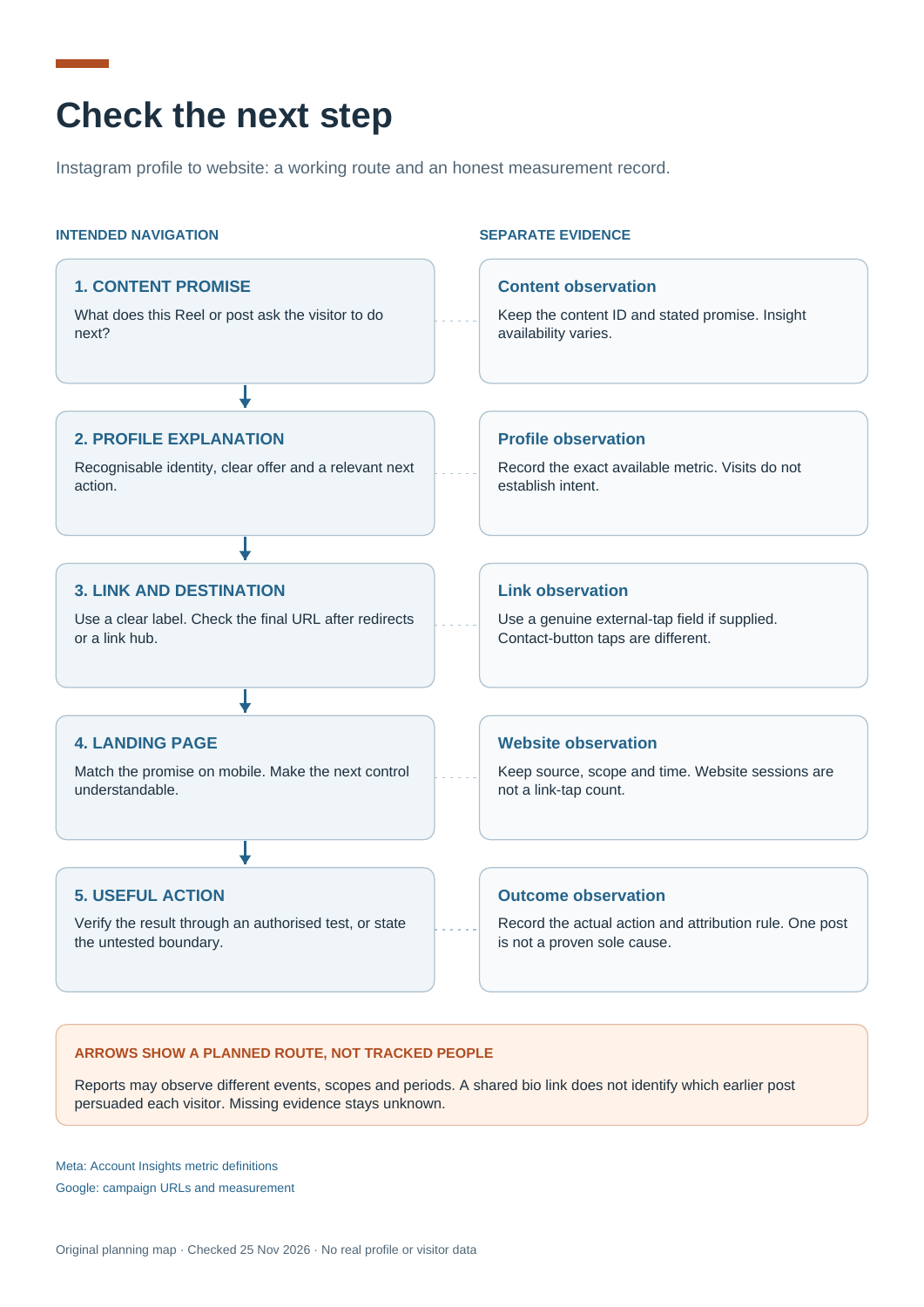
Use the actual published link, not just a URL pasted into a desktop browser. Open the content, move to the profile, select the intended link and continue to the destination from the mobile app. Record the device, app/browser context, date and the result of each step. A desktop check is useful additional evidence, but it does not establish the mobile experience.
- Confirm that the intended link and its useful label are visible in the visitor-facing profile.
- Tap through and note the final destination after any redirects or intermediary page.
- Check the first screen for matching content, readable text and a usable primary action.
- Try the intended action using an authorised test method; verify the result or confirmation.
- Record any extra sign-in, access request, unexpected redirect, broken control or missing information. Recheck the same route after a fix.
Use a test or preview mode for purchases and forms where one exists, or stop at the point requiring a real commitment. A path audit does not require an accidental order, unwanted message or false customer record. Record that boundary explicitly: “Form opened; submission not tested” is more accurate than marking the entire journey passed.
The downloadable path map separates the intended navigation from the evidence collected at each stage. A working link proves that the route was accessible in the conditions tested. It does not prove that every visitor followed it, that every event was recorded, or that an analytics system can connect the same person across all steps.
5. Complete the 12-point audit
For each row, record Pass, Needs change, Not checked or Not applicable, together with a short observation and evidence reference. Prioritise broken destinations and misleading promises before cosmetic changes. The downloadable version starts with every status set to Not checked; it does not claim that a live profile has already passed.
| No. | Audit area | Action | Evidence to record |
|---|---|---|---|
| 1 | Content promise | Write the exact next step the content asks for | Quoted promise and source content reference |
| 2 | Recognisable profile | Confirm the identity and offer match the originating content | Visitor-facing profile capture |
| 3 | Primary outcome | Name the one action this particular brief prioritises | Written action and intended audience |
| 4 | Bio clarity | State what the account offers and why this visitor should continue | Current and proposed bio |
| 5 | Link label | Describe the destination or action plainly | Visible label and destination heading |
| 6 | Destination match | Open the exact promised product, release, resource or service | Final URL and matching content |
| 7 | Mobile route | Test from the app through redirects or link hub | Device/context, time and observed route |
| 8 | Usable first screen | Check reading, navigation and access to the next control | Observed issue or successful check |
| 9 | Final action | Verify the intended outcome through an authorised test | Result or precise untested boundary |
| 10 | Metric identity | Record the exact profile, link and site fields available | Report names, definitions, dates and missing fields |
| 11 | Link identification | Verify any campaign parameters reach the intended destination | Tested URL and reporting evidence; no personal data |
| 12 | Controlled revision | Choose one change, owner and review condition | Baseline, change log and comparison limits |
A completed checklist should identify the next piece of work. For example: “The link opens, but the visitor reaches the full catalogue rather than the collection named in the Reel.” That observation supports testing the destination. “People did not like the products” goes beyond the evidence unless another source establishes it.
6. Use three original bio and CTA examples
These fictional examples show how a profile can continue a content promise. They are copy drafts, not real offers, testimonials or measured winners. Replace the subject and destination with your actual material, then check the final rendering in the account before publishing.
Shop: connect the promise to the destination
Content promise: A Reel introduces a current mug collection.
Vague draft: Things you will love. New ideas every day. Explore below.
Clearer bio: Everyday ceramics for small kitchens. Browse the current mug collection and delivery details below.
Link label: View the mug collection. Destination: The actual mug collection, with item availability and delivery details.
Names the product and the reason to continue; removes a vague instruction to explore.
Artist: connect the promise to the destination
Content promise: A Reel previews an instrumental release called North Window.
Vague draft: Music is my world. Follow the journey. All my links below.
Clearer bio: Instrumental songs for quiet nights. Listen to North Window and choose your music app below.
Link label: Listen to North Window. Destination: A page for the actual release with correctly labelled listening options.
Carries the release name from the content to the link and explains the listening choice.
Expert: connect the promise to the destination
Content promise: A Reel explains a common project handoff problem.
Vague draft: Helping people reach their potential. Tips, ideas and more.
Clearer bio: I help small teams plan clearer project handoffs. Download the one-page handoff checklist below.
Link label: Get the handoff checklist. Destination: The real checklist or a page that clearly explains any download or form step.
Identifies the audience, problem and concrete resource without inventing credentials or results.
The examples do not require changing every profile element at once. If the identity and offer are already clear, test the link label or destination that addresses the observed gap. Keep the previous copy and destination in the change log so the comparison has a reliable baseline.
7. Keep profile metrics, link events and website sessions distinct
Write down the fields that your account actually exposes and read their definitions. A particularly misleading name appears in the current Meta Account Insights API: profile_links_taps is defined as taps on address, call, email and text controls. It should not automatically be labelled “website clicks.” A convenient field name is not a substitute for its documented meaning. Source: current account metric definition.
Availability also differs by report and content type. Meta’s media reference lists profile-activity fields for certain formats rather than promising them for every Reel. Buffer’s current guide likewise says available metrics depend on the network and post type. Do not assume that an account-level observation can be attributed to an individual post. Source: media metric availability. Source: external reporting limits.
| Observation | What it can support | What it does not establish alone |
|---|---|---|
| Profile visits in a named report | Reported profile activity in that scope | Unique people or their intent to visit a website |
| A genuine external-link tap field, if available | The specified link action under that field’s definition | A fully loaded page or completed business action |
| Link-hub page and button events | Activity on that intermediary under its definitions | Which earlier Reel persuaded every visitor |
| Website sessions with known campaign values | Recorded site activity associated with those values | One session for every Instagram tap |
| A completed site or business action | The action recorded under your implementation | Proof that one particular post was its sole cause |
Google Analytics defines a session as a period of interaction with a website or app, with rules for starting and grouping that activity. That is different from a tap on a link. Compare the concepts before calculating a loss between them. A difference in totals is a question to investigate, not automatically a count of people who abandoned the page. Source: session definition.
Campaign parameters can identify traffic arriving through a tagged link. Google documents source, medium and campaign values and how they appear in acquisition reporting. A shared bio link can therefore identify its placement or campaign, but it does not reveal which of several earlier posts convinced a visitor to use that same link. Source: campaign URL parameters.
Use your established naming convention and check that parameters survive the route. Do not put names, email addresses or other personal information in campaign values. Separate optional link-hub measurements from the website’s own measurements, and retain unknown attribution where the evidence does not connect the steps.
8. Test one change and report what actually happened
Choose the first unresolved issue in the path. A broken destination calls for a fix and a repeat functional check. A clear route with a vague link label calls for a copy hypothesis. A missing metric calls for a measurement clarification. These are different jobs and should not all be diagnosed as “the bio is not converting.”
For a fictional shop, suppose the audit finds that “Explore” leads to a general homepage while the content promises mugs. A focused test could change the destination to the mug collection, keeping the other profile wording stable. Record the exact change, the content active in both periods and any paid activity or offer changes. If traffic composition changes, state that limit before attributing any difference to the destination.
Compare compatible reporting windows and preserve raw counts alongside any descriptive ratio. A website-tap-to-profile-visit ratio can describe two compatible report counts; it is not automatically the probability that a unique visitor clicked. Repeat visits, metric scope and incomplete attribution may prevent that interpretation. There is no universal rate in this audit that labels every profile healthy or broken.
End the review with four fields: observation, interpretation, uncertainty and next action. “The published link now opens the promised collection on the tested phone” is supported by a functional check. “This fixed every lost sale” is not. When the evidence is too limited, record what remains unknown and what another comparable observation must resolve.
Before increasing Instagram promotion activity, make sure the attention has a clear destination. Compare the actual service description with your intended goal and measurement. Additional reported activity does not itself establish website visits, useful enquiries or sales, and this audit does not promise any of those outcomes.
