Google Play Store Listing Experiments: Choose the Right Test and Metric
A Google Play store listing experiment plan should name the listing, language, changed asset and target metric before anyone prepares a variant. Choose the experiment type around that question. A graphics test on the default listing and a localized test do not necessarily reach the same people, even when the images look identical.
The useful result is a decision about a specific version of the listing. It is not a general verdict on the app, an explanation of every acquisition change or proof that a larger promotion budget will work. Preserve the original assets, record changes during the test and allow an inconclusive result to remain inconclusive.
The downloads contain an original selection tree and an editable experiment brief with two filled DEMO plans: one screenshot change and one Spanish description change. No Play Console account was accessed, experiment submitted or performance measured. The fictional app and copy examples are teaching materials. Current public documentation was checked on 26 November 2026.
Identify the listing and language before the experiment
Write down the app's package reference, public store URL, current release and exact listing. Confirm whether the question concerns the main listing or a custom listing, then record the languages and assets currently supplied. A folder named “English screenshots” is not evidence of which audience will see them.
Google's current experiment instructions cover default and custom listings. The setup is available through the chosen store listing; an unavailable setup option can indicate that the listing needs to be fully rolled out. Check the actual prompt rather than assuming every account state exposes the same action.
Separate language from country. “Spanish-speaking visitors” and “visitors in Spain” describe different populations. Write the language selection the experiment actually uses, while keeping the app's market availability and the campaign's country targeting in separate fields. Otherwise, a report labelled “Spain test” can conceal a language-based audience.
Preserve a control record that another person can identify: asset filenames or hashes, copy, screenshot order, language and capture date. Include any differences between phone and other supported device presentations. A test cannot be interpreted reliably if “the original” changes meaning halfway through the review.
Choose the experiment type in a fixed order
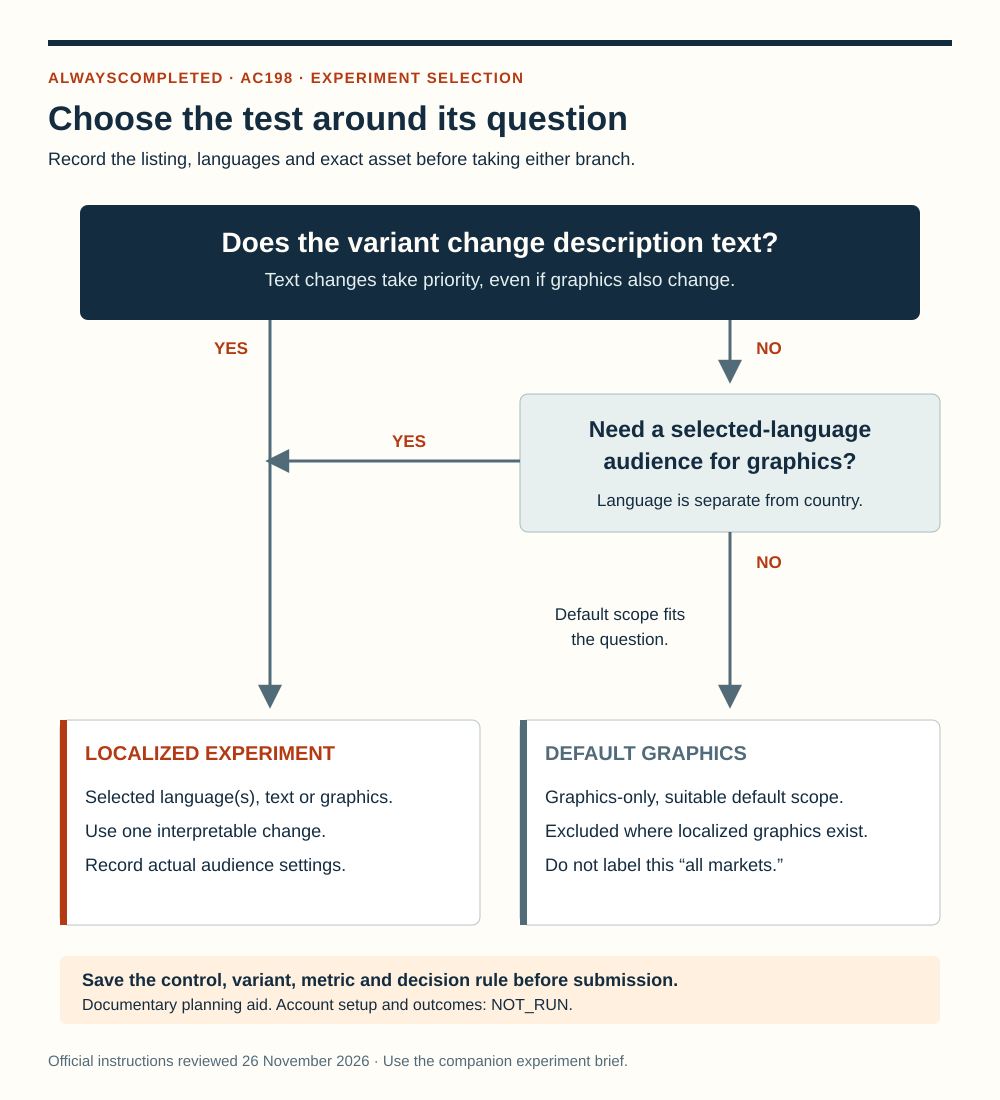
Use two questions. First, does the variant change description text? If yes, choose the localized route. If the change is graphics-only, ask whether the question requires a selected-language audience. Use localized testing for that audience; otherwise assess whether default graphics coverage fits the question.
The official type definitions describe default graphics testing for icons, feature graphics and screenshots in the default listing language. Visitors seeing a language with localized graphic assets are excluded from that default experiment. Localized experiments can test graphics and descriptions for the selected listing languages.
This is why “default” should not be renamed “all markets” in a planning sheet. A localized feature graphic can change default-test eligibility even when the experiment itself changes another visual asset. Keep an inventory of existing localized graphics next to the audience assumptions.
| Planned change and audience | Appropriate planning route | Point to preserve in the brief |
|---|---|---|
| Description wording in a selected language | Localized experiment | Exact language and complete old/new copy |
| Graphics-only question limited to a chosen language | Localized experiment | The language scope, not an assumed country scope |
| Graphics-only question where default coverage is suitable | Default graphics experiment | Existing localized-graphics exclusions |
If the proposed change does not fit the documented asset types, clarify the experiment's scope before building the variant. Do not silently substitute a different change merely because a convenient field is available.
Record the target metric exactly as shown
The experiment setup documentation currently names Unique user install clicks, Unique user open clicks and Unique user pre-registration clicks. Choose the available metric that matches the decision, and copy its current definition into the brief alongside the report date.
There is a documentation difference worth preserving. The experiment guide's detailed metric table still uses outcome wording such as installed or opened, while Google's current store listing measurement guide explicitly defines those named metrics as unique users clicking the respective buttons. That guide separates click-based listing performance from completed acquisitions available elsewhere. Do not relabel a click count as a successful installation. If the actual experiment's definition remains unclear, ask technical support about that specific report and retain the wording in the decision record.
A metric can be appropriate without representing the final business outcome. An install-intent question concerns the store decision. Successful installation, first use, a completed task and payment belong to later observations. Keep those as separate checks, with their own source and cohort definition, instead of replacing the experiment's target metric after seeing the result.
Write the intended decision before launch: “We will consider the variant if the platform's reported result supports it for the selected metric, the asset remains accurate and no unresolved change compromises interpretation.” Add the action for a draw or insufficient evidence. That prevents the team from deciding afterward that whichever number rose was the goal.
Make one interpretable change
“One asset” does not automatically mean one idea. A replacement first screenshot could alter the headline, interface, feature, colors and price claim at once. Even if the platform reports a difference, the team would only know that the whole replacement performed differently.
Choose how much explanation you need from the result. If the question is about a headline's clarity, retain the same app view, framing, screenshot position and other copy. If the question is about showing a different feature, treat that larger visual concept as the tested unit and describe it honestly.
Review the variant against the actual current app. Can the depicted action be performed? Is any paid requirement clear? Does the localized wording describe the same feature rather than promising an extra one? A misleading promise is not an acceptable winner simply because it attracts clicks.
Use an independent content check before submission. Ask the reviewer to identify the changed element without being told the hypothesis. If they find additional changes, either remove them or update the brief so the tested concept is accurate. Save the final approved control and variant together.
Record allocation and decision settings without inventing a duration
The setup includes audience allocation and advanced statistical settings. Record the actual values shown: variant count, experimental audience percentage, minimum detectable effect and confidence level. The creation page provides an estimate of the evidence and time needed. Use that estimate as planning information, not a promised finish date. Experiment setup and results
Understand the allocation denominator. The experimental audience percentage describes impressions assigned to experimental variants; the current listing retains the remaining share. With more than one variant, record how the experimental share is divided. Do not write “50/50 test” when the configured distribution means something different.
The downloadable examples propose one variant and a 50% experimental audience as DEMO planning choices, not a universal recommendation or observed account setting. Minimum detectable effect and confidence remain fields to record from the real setup. Changing them simply to make an estimate look faster changes the question's sensitivity or uncertainty.
Set a practical review date and a resource limit. A scheduled review can decide to continue, end without a conclusion or redesign the question. It cannot turn a short, unresolved run into a statistically established winner. More traffic may add observations, but a change in its composition also changes the audience context worth recording.
Keep app and campaign changes in the same log
Use a dated change log throughout the experiment. Include releases, pricing or subscription changes, availability changes, major campaigns, localization edits and incidents that affect the feature being shown. Identify which changes were planned and which were unexpected.
A campaign added during a randomized experiment does not automatically make every comparison invalid. It does change the mix of people for whom the result is observed. Similarly, an app update that removes the pictured screen creates a direct accuracy problem even if the statistical report looks favorable. Explain the specific concern rather than applying a blanket rule.
Record source and market context from the appropriate reporting surfaces. Keep it separate from the experiment's configured language and allocation. Avoid claiming that a listing result belongs to one campaign merely because the campaign ran during the same dates.
The small-budget decision guide helps define stop, fix and continue choices. Apple's product page optimization workflow is a separate platform process; its field names and eligibility rules should not be copied into a Play brief.
Use the two DEMO plans as concrete examples
DEMO A: clarify one screenshot
The fictional rehearsal app Practice Lantern has a default English listing. The plan changes only the caption on its first screenshot, from “Keep rehearsals organized” to “See your next song and rehearsal note.” The same interface image, crop, order and other assets remain in the plan.
The question is whether the more specific caption communicates the existing rehearsal-note function more clearly. Default graphics is the proposed route because default coverage fits this question; the example explicitly notes that the app's fictional French localized graphics are outside that coverage. It does not claim a result for all languages.
The chosen target label is Unique user install clicks. Upload, submission, assignment and outcome are all NOT_RUN. The correct completed preparation is the versioned plan, not a fabricated screenshot of a console result.
DEMO B: test localized description wording
The second plan concerns the Spanish short description: a broad organization statement is compared with specific wording about ordering songs and saving rehearsal notes. It uses the localized route, with the intended Spanish listing language recorded. Screenshots, icon, feature graphic and other copy stay unchanged in this example.
The Spanish text is original teaching copy, not a professional localization approval. A real team should review meaning, regional usage and the actual app feature before submission. The filled brief includes a separate language-review field and preserves NOT_RUN for account actions. No improvement percentage is invented for either plan.
Review the result before applying the variant
Read the result together with its explanation, confidence interval and decision settings. Preserve an insufficient-data status as insufficient; a draw does not establish that the pages are identical in every respect. If the current listing is preferred, keeping it is a useful outcome. Google's results guidance describes reviewing the recommendation before applying a variant.
Close the record with the actual tested assets, dates, audience, metric, platform status, relevant changes and the decision owner. If a variant is applied, verify the intended public listing and language afterward. Keep its observed publication state separate from the experimental conclusion.
Before adding promotion, review the public destination and the counted activity on the AlwaysCompleted app and store promotion page. Ask technical support about the selected offer's accepted app link, market and reporting unit. Catalogue delivery, a store experiment and downstream app use remain separate observations.
