Accessible X Media: Image Descriptions and Checked Captions
Before posting media on X, identify the information a person would miss without seeing the image or hearing the audio. Put the important visual meaning into an image description, and give spoken information accurate, synchronized captions. Then inspect the published result; a completed upload field is only the first check.
This guide includes four original pairs of weak and improved image descriptions, plus a fifteen-second teaching script, an SRT caption draft and a QA worksheet. The four visual examples are original illustrated mockups supplied as SVG and PNG, not screenshots of real posts. No audio was recorded or played, so the proposed caption timings have been checked structurally but not synchronized against a recording.
Identify what the media alone communicates
Read the post text without its image. Can a reader still find the event time, understand the comparison or follow the next action? Then watch a speaking video without sound. Does the same useful message survive? These simple editorial checks help you identify information that needs another form.
Create a small inventory for the post: image one, image two, video speech, meaningful sounds and any text embedded in a graphic. Assign an owner to each item. A multi-image post can contain one accessible description and several unexplained images, so checking only the first image is insufficient.
Keep the post text and media descriptions complementary. The post can explain why the subject matters; the description can supply the visual details needed to understand it. If essential information exists only inside an image, preserve it in readable text rather than assuming the design is legible to everyone.
For a release card, the key information may be the artist, release title, date and listening destination. For a chart, it may be the measure, units, period and comparison. A photograph may need only the relevant action and setting. The goal is the meaning of this image in this post, not an inventory of every pixel.
Add a description to each relevant image
X’s image-description instructions describe adding a description to each image and reading it through the published ALT badge. The documented controls differ slightly between app and desktop: use the image’s ALT or description option, save the text and check the resulting badge.
Write the description while the source image is still available at full size. That makes it easier to check small text, units and labels before the media is cropped or compressed for a post. If someone else creates the design, include the image description in the handoff rather than asking the publisher to reconstruct it at the last moment.
X’s writing guidance recommends clear, relevant, objective descriptions and preserving important image text. Avoid replacing the description with a list of search keywords or a promotional slogan. “Best new music, viral release, trending artist” does not explain a release card.
Also avoid inventing context. If a person is leaning over a keyboard, describe the visible action relevant to the post. Do not claim they have just finished a hit song or are feeling a particular emotion unless that information is independently established and useful. An image description should not quietly create a new factual claim.
Four original description rewrites
1. Release announcement card
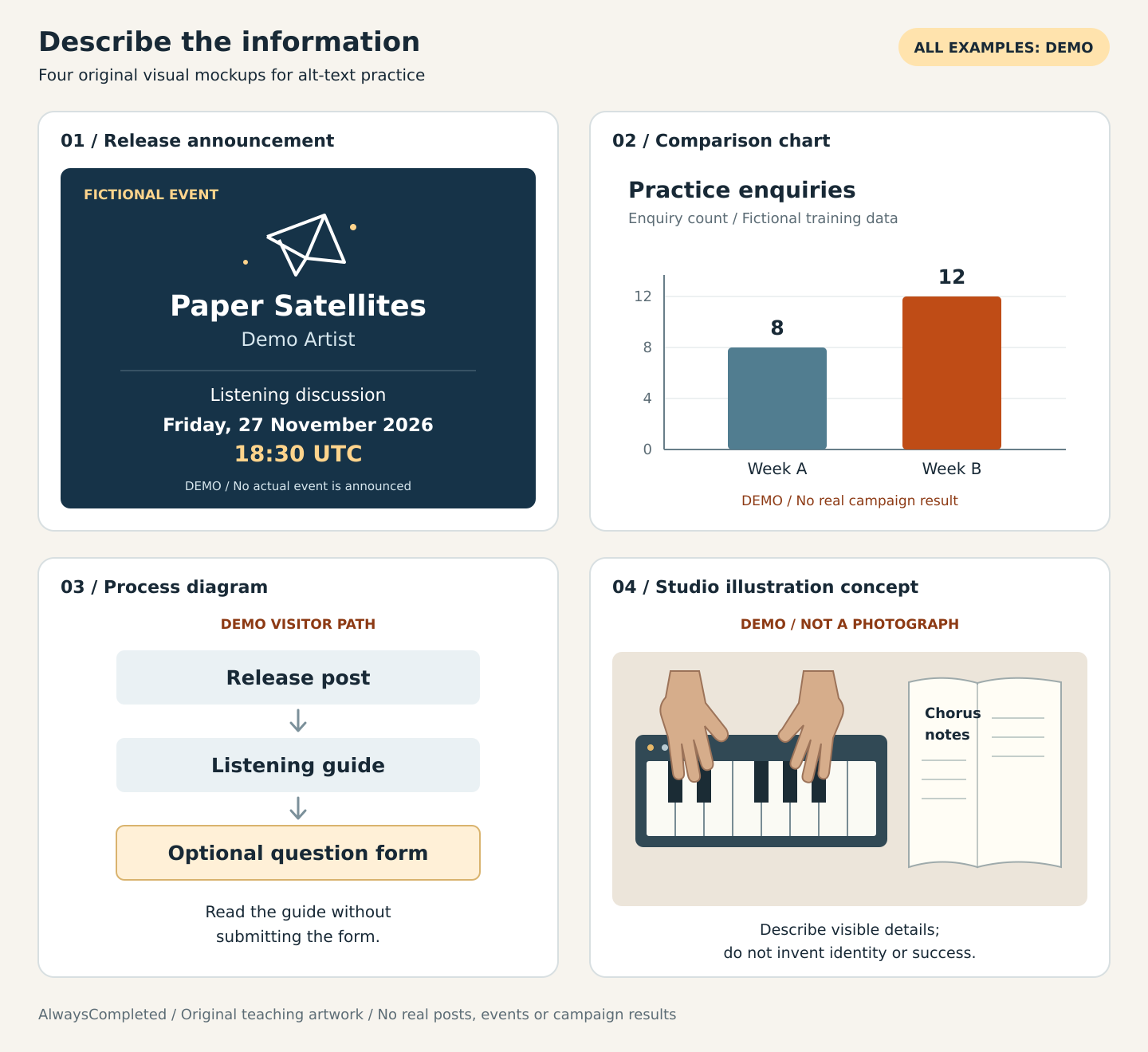
DEMO visual: a dark blue card with a small paper-satellite illustration. Its text reads “Paper Satellites — Demo Artist. Listening discussion: Friday, 27 November 2026, 18:30 UTC.” It is a fictional event design.
Weak description: “New release! Join us.”
Improved description: “DEMO announcement card for Paper Satellites by Demo Artist. The listening discussion is Friday, 27 November 2026 at 18:30 UTC. A white paper-satellite illustration sits above the text on a dark blue background.”
The rewrite preserves the time and timezone that a reader would otherwise need to see. In a real post, verify them against the approved schedule. If the main text already carries the details, review the description for unnecessary repetition while keeping the image understandable in context.
2. Simple comparison chart
DEMO visual: two bars labelled “Week A: 8” and “Week B: 12.” The chart title is “Practice enquiries”; a visible footer says “Fictional training data.” The vertical axis measures enquiry count.
Weak description: “Our results went up.”
Improved description: “DEMO bar chart of fictional practice enquiries: 8 in Week A and 12 in Week B. The axis is enquiry count. The chart is training data and does not show a real campaign result.”
The rewritten description identifies what was counted and keeps the fictional label attached to the numbers. It does not infer sales, causation or campaign effectiveness from the shape of a bar.
3. Process diagram
DEMO visual: three boxes in order: “Release post,” “Listening guide,” and “Optional question form.” Arrows connect the first to the second and the second to the third. A note says “The guide is available without submitting the form.”
Weak description: “Follow the steps.”
Improved description: “DEMO visitor path: release post leads to a listening guide, then to an optional question form. The guide can be read without submitting the form.”
The description conveys the relationship and the important optional step. The box colors are not necessary to explain that route. If color represents a separate condition, name the condition rather than relying on the color alone.
4. Studio illustration concept
DEMO visual: an original illustration, not a photograph. Two hands rest on a small keyboard beside a notebook containing the heading “Chorus notes.” The composition does not show a face.
Weak description: “A talented producer making a hit.”
Improved description: “DEMO studio illustration: two hands on a small keyboard beside an open notebook headed ‘Chorus notes.’ No face is shown.”
The rewrite removes an unsupported identity and success claim. If this concept becomes a photograph, inspect that photograph and write a fresh description of what was actually produced.
Preserve important text and data without overcrowding the description
Use the information hierarchy of the image. In a release card, the title and time matter more than a decorative border. In a chart, the measure and comparison matter more than the exact shade of a bar. In a diagram, the sequence and exceptions matter more than the box shape.
For dense material, do not force a whole report into one description. Summarize the relevant finding accurately and provide a readable source or fuller explanation in the post’s destination. X’s writing guide specifically addresses complex visuals and links to supporting material. Source: writing image descriptions.
Check abbreviations and units with the same care as the main post. A missing currency, date or timezone can change the practical meaning. Avoid treating the image description as a place where less rigorous claims are acceptable because fewer people will inspect it.
Prepare a caption draft from the actual speech
Captions convey speech and the non-speech audio information needed to understand the content, synchronized with the audio. W3C’s caption guidance explains why automatic text needs accuracy review. A missing negative word or an incorrect number can reverse the message.
For real media, transcribe the final edit, not an earlier script that the speaker changed. Check names, product terms, dates, numbers and short words such as “not.” Include a speaker label when the identity is needed to follow an exchange, and identify meaningful sounds when they affect understanding.
The downloadable DEMO has four spoken cues and a closing chime across a planned fifteen seconds. Its first line is “I'm Demo Host. Here's our release check.” Later lines announce 18:30 UTC on Friday and name the fictional track Paper Satellites. These details give a reviewer concrete names and numbers to verify.
The SRT contains numbered cues with start and end times. It is a timed text draft, not evidence that the words were spoken at those moments. When recording the exercise, adjust the cue boundaries against the actual edit. Do not stretch a rushed recording or leave inaccurate timing simply to retain the sample file unchanged.
A sound label such as “[Short chime]” belongs only if the actual audio contains that relevant sound. Remove it if the final recording does not. Similarly, captions should not narrate a visual action that is absent from the audio as if the speaker said it; review visual information separately where necessary.
Upload through the documented web workflow
X’s caption-file instructions describe uploading a video in the web composer, choosing Upload caption file (.srt), selecting the file and completing the upload. Check that the expected caption language appears, then review the post. The guide labels this upload feature as web-only.
Use the controls actually available in the account. This article does not assume Media Studio access or apply a Media Studio-specific capability to every publisher. If the documented option is absent, record the environment and check the current help path rather than claiming the caption file was attached.
After upload, check playback with captions enabled. The exact player or device setting can affect what appears. A language label under the draft is useful evidence of the upload stage, but it does not establish that every cue is accurate or legible during playback.
Review names, numbers and synchronization separately
Run a text pass first. Compare each caption with the approved transcript, including the spelling of Demo Host and Paper Satellites in the exercise. Check 18:30 and UTC as a pair. Correcting the time but omitting the timezone would leave the announcement incomplete.
Run a timing pass against the final audio. Watch for captions that begin before the relevant speech, remain after the topic changes or disappear too quickly to read. Readable line breaks should follow phrases when possible. A syntactically valid SRT can still be poorly synchronized.
Then run a meaning pass without sound. Can the viewer understand the message and any meaningful sound cue? Check that captions do not obscure essential visual labels. If the video also uses text overlays, make sure the caption and visual information do not contradict one another.
The supplied file has sequential cues, valid timestamp structure, no overlap and a final end time of 00:00:15,000. Those are local file checks. Audio synchronization, X upload, actual player display and assistive-technology testing remain NOT_RUN for this package.
Check the public post and keep the sources
After authorized publication, open every image’s ALT badge and read the text that is actually attached. Confirm that the description belongs to that image, especially if image order changed during editing. Play the published video with captions enabled and verify the important cues again.
Keep the final image files, approved descriptions, transcript, caption file and a short QA record together. The music-release asset handoff guide can help organize the wider package. Preserve which caption version matches which video edit so later replacements do not silently lose synchronization.
Downloads and next step
- Four original visual mockups and alt-text pairs
- Four-panel DEMO illustration, PNG
- Editable four-panel DEMO illustration, SVG
- Fifteen-second DEMO transcript and timing plan
- Fifteen-second DEMO SRT caption draft
- Image and caption QA worksheet
Complete the information checks before expanding distribution. If you use X promotion services, identify the exact published object and the selected service metric. Clear descriptions and checked captions improve access to the material; this guide does not promise an algorithm, ranking or conversion increase.
