Claim a TIDAL Artist Profile: New Access, Existing Claims and Duplicates
Before claiming a TIDAL artist profile, check whether it is unclaimed, already linked to your account or awaiting a decision. Then check the catalogue separately. A missing claim option, an old Artist Home record and music split between two pages need different next steps.
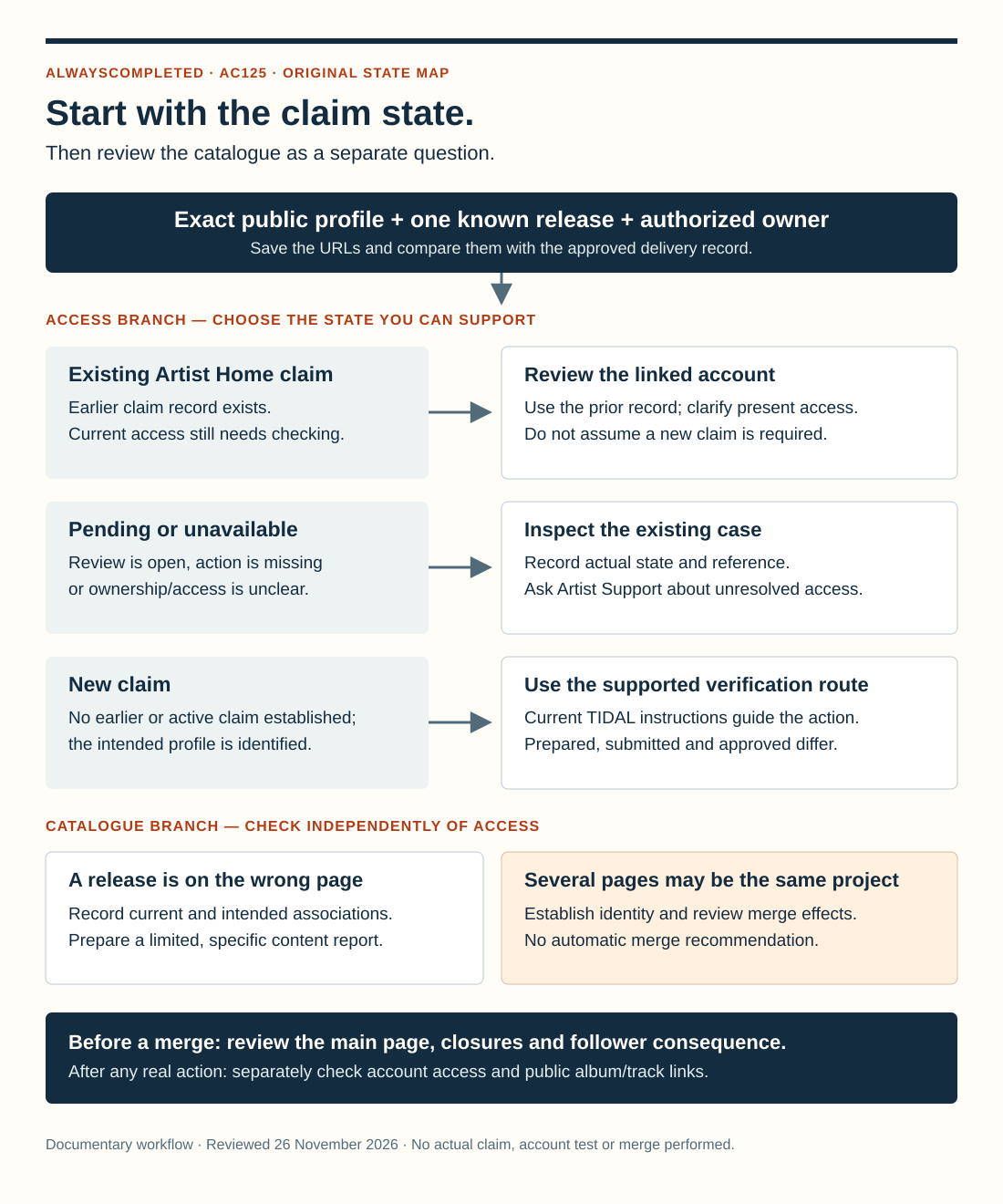
This guide uses TIDAL's current public claim instructions, reviewed on 26 November 2026. It includes an original state diagram and an evidence checklist with a fictional returning Artist Home user. No account was accessed, claim submitted or profile merged for this article. The purpose is to prepare the correct action and record its actual result.
Locate the exact artist page and a known release
Start from a release the artist can identify. Open its artist destination and save the profile URL together with the album or track URL. Compare the credited name and recording with the distributor's approved record. This gives you an identity trail stronger than the first matching search result.
TIDAL's profile-link guide explains copying the public profile link and offers Artist Support help when the artist ID or destination cannot be located. Record the real URL rather than constructing one from the display name.
If the catalogue contains unfamiliar music, mark the issue before making a claim. Determine whether the page belongs to a different artist, contains a misplaced release or is one of several pages for the same project. Those possibilities lead to different reports.
Keep the proposed account owner and public artist identity separate in your worksheet. The person organizing evidence may be a manager, while the account and verification information belong to the authorized artist team. Do not infer authority simply because someone has the public link.
Check for an earlier Artist Home claim
TIDAL's current claim guide says earlier Artist Home claims remain linked to the TIDAL account. They do not need to be submitted again. Sign in through the current route and inspect the account's profile area.
Before creating a new request, search the team's existing records for the earlier claim confirmation, the profile URL and the account contact associated with it. Use those records to identify the relevant account without circulating its password or recovery codes.
An old confirmation is evidence of history, not proof of present access. Record whether the authorized user can currently reach the intended profile and what the interface actually shows. If that connection is unclear, ask technical support to review the existing relationship instead of treating the artist as a new claimant automatically.
Some distributor articles still describe the older Artist Home interface. Do not combine their menu names with the current TIDAL workflow and present the result as a tested sequence. Use the current platform instructions for the action you are taking, and describe any interface difference in the case record.
Choose a verification route for a genuinely new claim
The current route begins at tidal.com, on the intended artist profile's claim option. TIDAL lists DistroKid, CD Baby and TuneCore for distributor verification, with manual verification as another route. It currently limits each TIDAL account to one claimed profile.
Choose the route that matches the artist's actual relationship. A distributor name in a menu does not mean somebody else's distributor account can be used as evidence. If the appropriate connection is unavailable, inspect the supported alternative rather than changing the artist's delivery history to fit the form.
Prepare the release evidence before starting: the intended profile, one known release, the distributor reference and the authorized contact. Check what the current form requests and supply that information accurately. Do not send private identity documents through an unrelated public comment or a general promotional worksheet.
Record submission only after it actually occurs. A completed draft, an opened verification screen and a submitted claim are different states. If you leave the process before sending it, the record should say “prepared” or “not submitted,” not “pending review.”
Diagnose a pending or unavailable claim
TIDAL says an active review blocks additional claims for that profile. An unavailable claim option can also reflect a restricted profile or an existing claim by somebody else. Its guide directs unresolved cases to Artist Support.
Capture the exact state you see: a pending message, an unavailable action, a sign-in problem or a confirmation associated with another account. Include the date, surface and public profile URL. “There is no button” is useful only when the reviewer knows which profile and signed-in context you inspected.
Check the existing request record before making another attempt. If the team already submitted a claim, retain the reference and current response rather than starting a second description of the same case. If you do not recognize an existing claimant, explain the uncertainty and provide evidence of the artist relationship.
Do not interpret silence as rejection or an interface change as lost ownership. A sensible next review date helps the team follow up, but it does not create a guaranteed decision date. Use any current timing information from the platform as guidance for that case and record actual responses when they arrive.
Build a compact evidence package
The evidence sheet connects five things: the current state, the responsible person, the exact profile, the relevant release and any report or claim reference. Keep each on its own line. This prevents a catalogue complaint from being mistaken for an access request.
For the profile, save the URL and observed name. For the release, save the album or track URL, approved artist credit and distributor reference. For access, record whether there is an earlier claim, a pending request or no known claim. For a catalogue issue, record the current and intended associations.
Add evidence in the form that answers the question. A screenshot can show an error, but the URL and error text should also be written out. A distributor record can identify a release, but unrelated financial or personal information should not travel with it.
Give the case one owner who can review the platform's response and ask the artist for missing information. Record what the owner is authorized to do. Preparing evidence does not automatically authorize a profile merge or a change in the artist's public identity.
DEMO: a returning Artist Home user
The fictional artist Ellis North previously claimed the profile for the project Quiet Bearings through Artist Home. The team has an old confirmation and a known release called Harbour Signals. A manager sees an unfamiliar current interface and assumes the profile needs to be claimed again.
The worksheet changes the starting question: can the authorized user locate the existing claimed relationship from the appropriate account? The old confirmation, profile URL and release record are assembled before a new application is considered. If present access remains unclear, the support draft asks about that existing claim.
No successful sign-in or restored access is invented in the example. Its final state is “existing-claim review prepared; actual account check NOT_RUN.” That is a complete preparation outcome and an honest limit on what the example demonstrates.
The same record can support a real artist later by replacing the fictional values and adding dated observations. Keep the earlier evidence rather than overwriting it with an assumed new account state.
Separate duplicate profiles from somebody else's release
A duplicate-profile question asks whether two pages represent the same artist or project. A wrong-content question asks whether a particular recording is attached to the wrong artist. Similar names alone do not settle either question.
Before discussing a merge, list the releases on each page and identify which belong to the same project. Record the proposed main profile and any unresolved identity conflict. A page that contains another artist's catalogue should not be swept into a merge request simply because one of your tracks appears there.
TIDAL's current guide states that a merge leaves one main profile, closes duplicates and does not transfer followers from the closed pages. It also notes that names can be aligned to distributor records during claims or catalogue changes. Review those consequences with the authorized owner before proposing a merge.
The worksheet therefore has a separate “merge implications” row. It asks which profile would remain, what would close, how the follower consequence was reviewed and who authorized the specific request. It does not recommend merging by default or treat an evidence checklist as approval to do so.
Report the specific catalogue issue
Current TIDAL reporting is available in the web player or desktop app through Report. The available categories depend on the artist, album or track opened. For misplaced music, its guide directs the report from the artist page where that content currently appears; mobile reporting is not yet included in that instruction.
Write the requested change in object terms: “Review this album's association with this artist page,” or “Review whether these two verified pages represent the same project.” Include the current location and intended destination if known. If the correct destination is unknown, state that instead of inventing one.
Keep the request limited to the identified releases. A broad instruction such as “move all of this” is difficult to assess when a page is mixed. Your own evidence package should make the scope clear before the platform reviews it.
If you work through a distributor, use its current documented route and preserve any platform reference it supplies. CD Baby's wrong-page guide describes that company's escalation context. It is not a substitute for the current TIDAL reporting interface or a universal route for every distributor.
Recheck access and the public catalogue separately
After a real claim decision, have the authorized user check the intended account relationship. Then inspect the public profile, release and track links. Access approval and catalogue accuracy are two separate observations, even when they are reviewed on the same day.
After a catalogue correction, open the original affected album and track URLs, follow their artist links and compare the visible catalogue with the approved record. If a profile was merged under an expressly reviewed request, check the remaining destination and the specific consequences recorded beforehand. Do not infer that an old promotional URL now works correctly.
Save the actual surface, date and remaining discrepancy. A result that is correct in one view and stale in another should be reported with that scope. A response saying a change was approved is useful evidence, but the public check records what the audience can actually reach.
For a broader identity review on another service, the Apple Music artist-page checklist offers a separate record. Keep each platform's claim and correction rules attached to its own task.
Hand over the verified destination
Once the intended profile and releases are checked, update the team's link register and promotional materials. Keep the final URL with its object type: artist, album or track. The music-platform promotion guide explains why different listing destinations and quantities should be compared separately.
A promotional service does not establish authority to claim a profile or approval to merge catalogues. For access and identity issues, use the documented platform process and the evidence record below.
